
AWS SES Rate Limiting & Bounce Handling System
Need help with your AWS SES System?
Put strong safeguards into place for your AWS SES system. STOP emails from going out if any individual email account starts sending out of control. If you’ve had an AWS TOS violation, this will help avoid another incident.
We’ve built a portal that allows you to set rate limits by day or hour, as well as bounce rates by day or hour. If anything hits that threshold, the system automatically revokes the IAM user and stops sending.
This functionality is not available natively in AWS – we asked their team. After working with many frustrated clients, we built it ourselves, using serverless Lambda functions and other methods – all within your AWS environment.
Free consultation! Talk to the Customer Paradigm team, who who can give unbiased advice on how to best set up and monitor your AWS SES integration. Call or text us today – 303.473.4400
Please Contact Me Now:
Rate Limiting & Bounce Handling System for Amazon SES emails
How does AWS SES Rate Limiting System Actually Work?
Everything happens within your AWS instance, and there are no external connections to any other systems. We did this because it’s the most secure way to handle the emails.
We’ve created a solution that safeguards your SES system by:
- Each email address is set up and configured as its own IAM user in your system.
- We add IP-level restrictions to the email account to safeguard sending.
- Anytime any system sends out an outbound email via Amazon SES, we use serverless Lambda functions to track what email was sent, including the subject line, recipients, and whether or not it bounced.
- We store all of this information in a mySQL database – also hosted in your AWS environment.
- You’re able to use an online portal to configure, track, test and re-key email accounts.
- If any email account is compromised, hacked, starts sending out of control or bouncing more than a specific threshold, the system yanks the SMTP keys and disables sending right away.
- In the portal, you’re able to re-key an email account and re-generate the username and password. (You’ll need to update your application separately.)
- We offer this as a full-service set up (we do everything for you in your AWS environment) or as self-service (where we give you the manual to set it up, and we include a free one hour support call)
- The additional AWS costs for running this on a medium-volume system is about $10-$20 in AWS costs per month, including lambda functions, a mySQL database and a small micro EC2 or lightsail server to run the rate limiting portal.
You’ll also receive an email from AWS – letting you know.
Here’s a walk through of how the portal works:
Step 1: Send a Test email via AWS SES:
While it’s wonderful to trust that a system “works” – it’s even better to be able to test and see the system in action.
For this example, I set the hourly rate for sending to five emails. Not a problem for the system to send five emails, but after that, that email address is cut off. (Now this is for testing – on a live production system this might be 250 per hour / 1,000 per day, depending on the typical volume of your application.)
We’ve developed a quick and easy way to test that the rate limiting and bounce handling system works to revoke the SMTP credentials right away.
On this page, you can send a test email to test out the system:
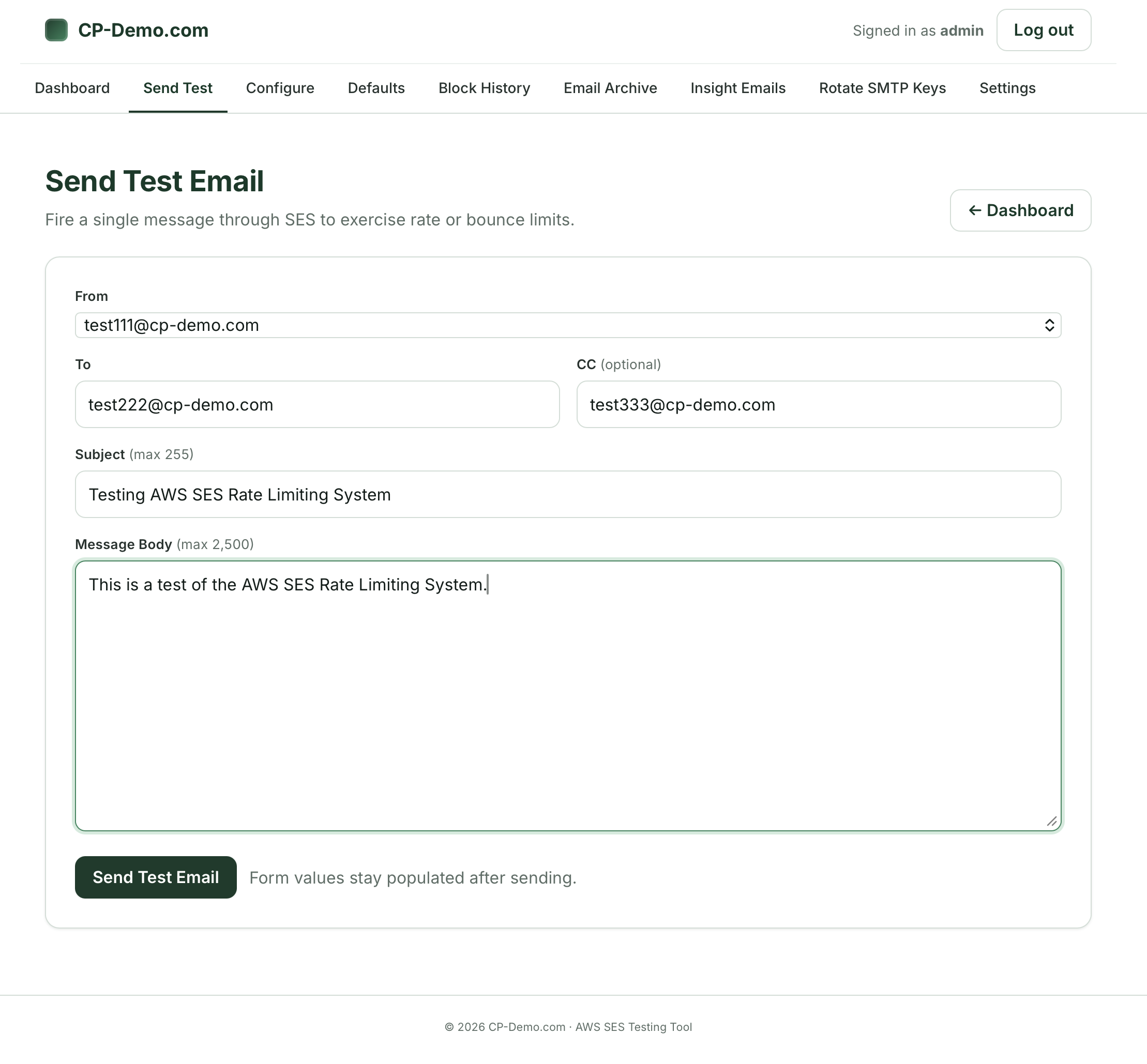
On the page, you can select the FROM email address from the list of verified SES email accounts. We own the cp-demo.com domain, and have set this up for testing purposes (most of our clients don’t want us to show off their internal email settings).
The To line is for the email that goes to the recipient. If your system is in a Sandbox mode (like this demo account), then you have to ensure that the emails you are sending to are verified in the AWS SES system. If your system is not in a sandbox mode, then you can select anything. We’ve included a CC line to optionally test as well.
- Subject line: you can use this for testing
- Message Body: we are only sending plain text emails from the test system – mostly to keep things as simple as possible.
Once you hit the “Send Test Email” the system will then fire off the email to the recipient.
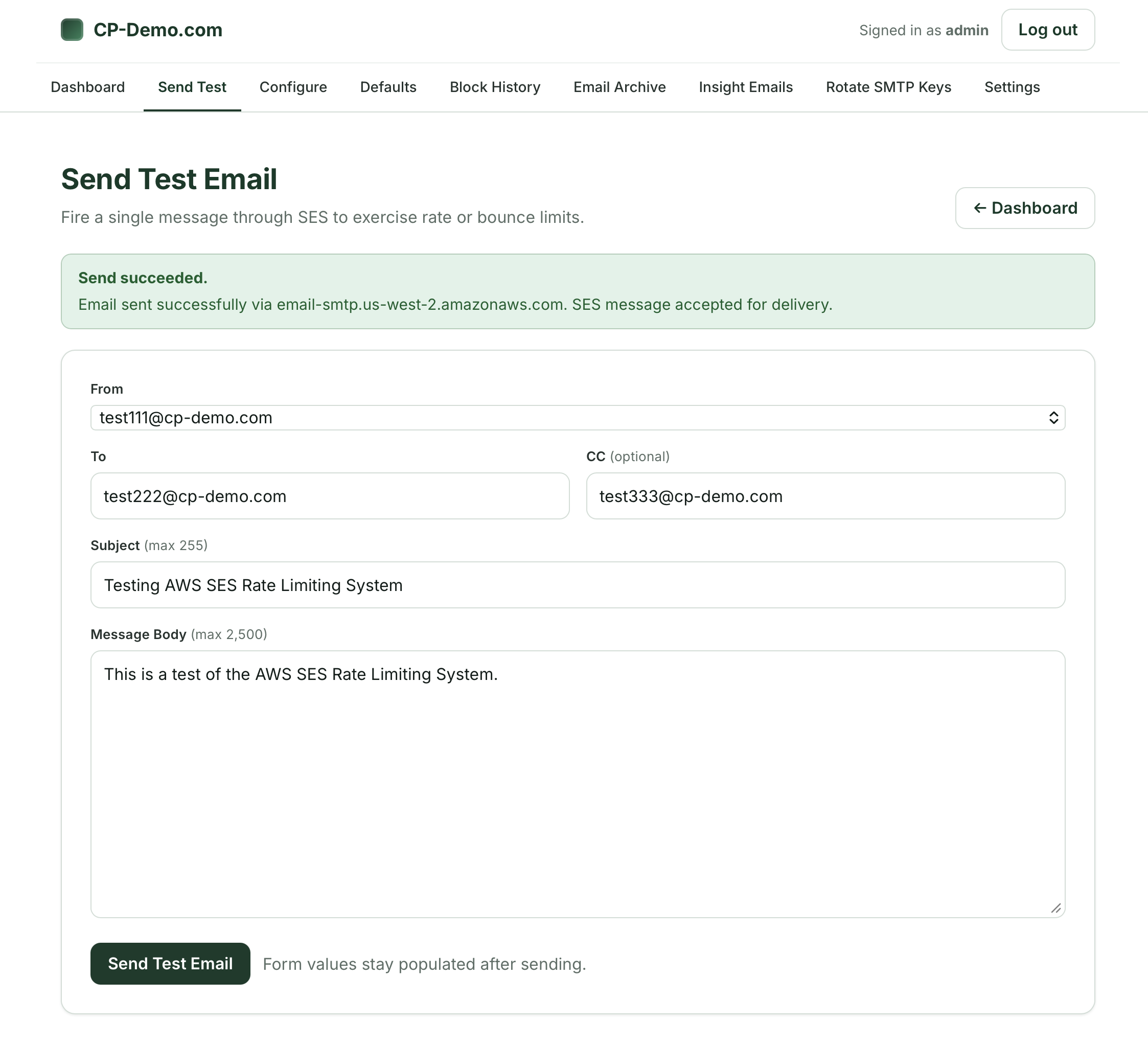
Step 2: Send Test Email – Success:
In this case, our first test was successful and it went through – this is because we have not yet hit a rate limit threshold of five emails per hour:
Step 3: Send Second, Third, Fourth Test Email – Success:
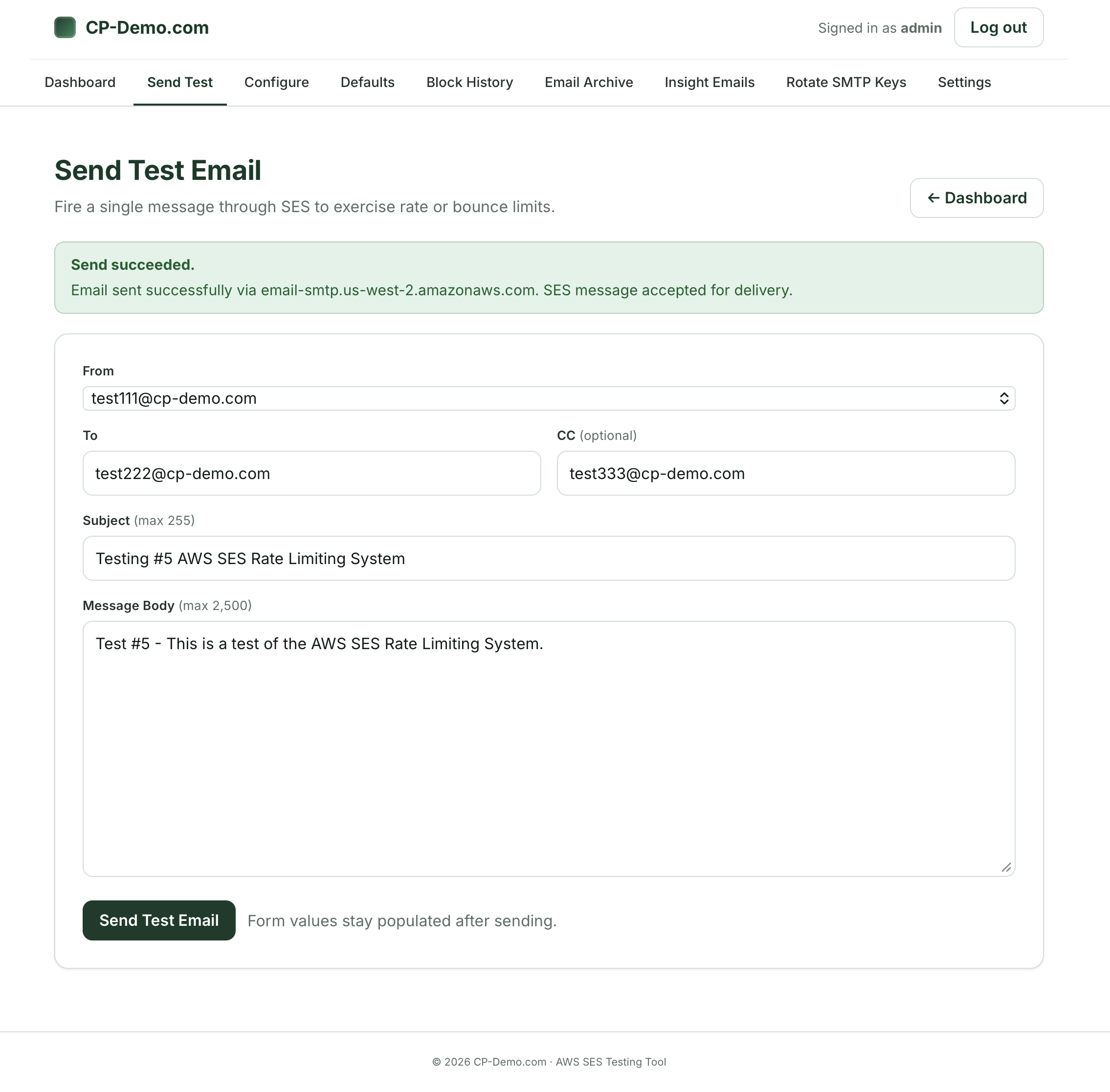
I next sent a second, third, fourth and fifth test through the system – to see it it would go through – and it did:
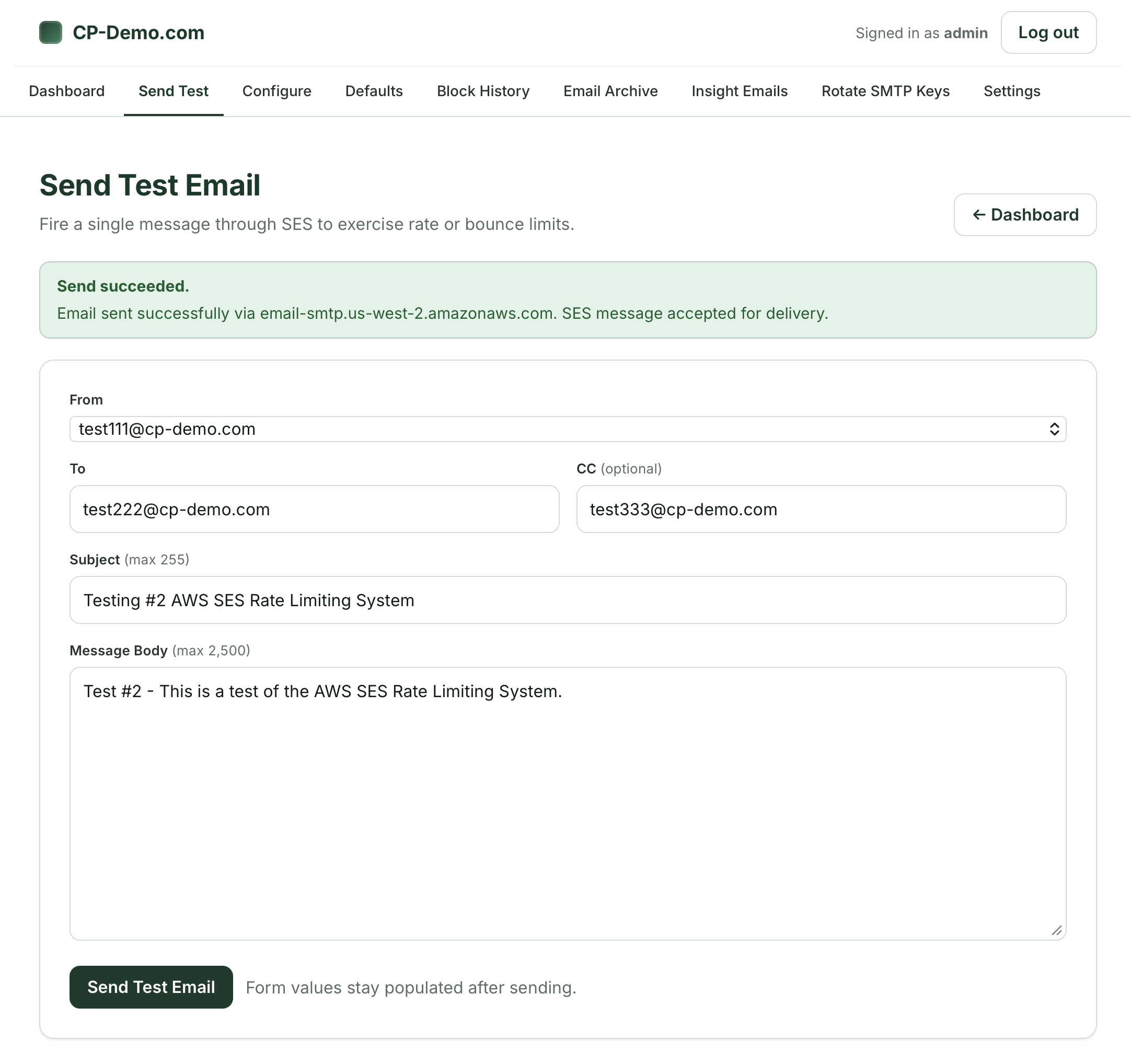
Here’s the third attempt (success)
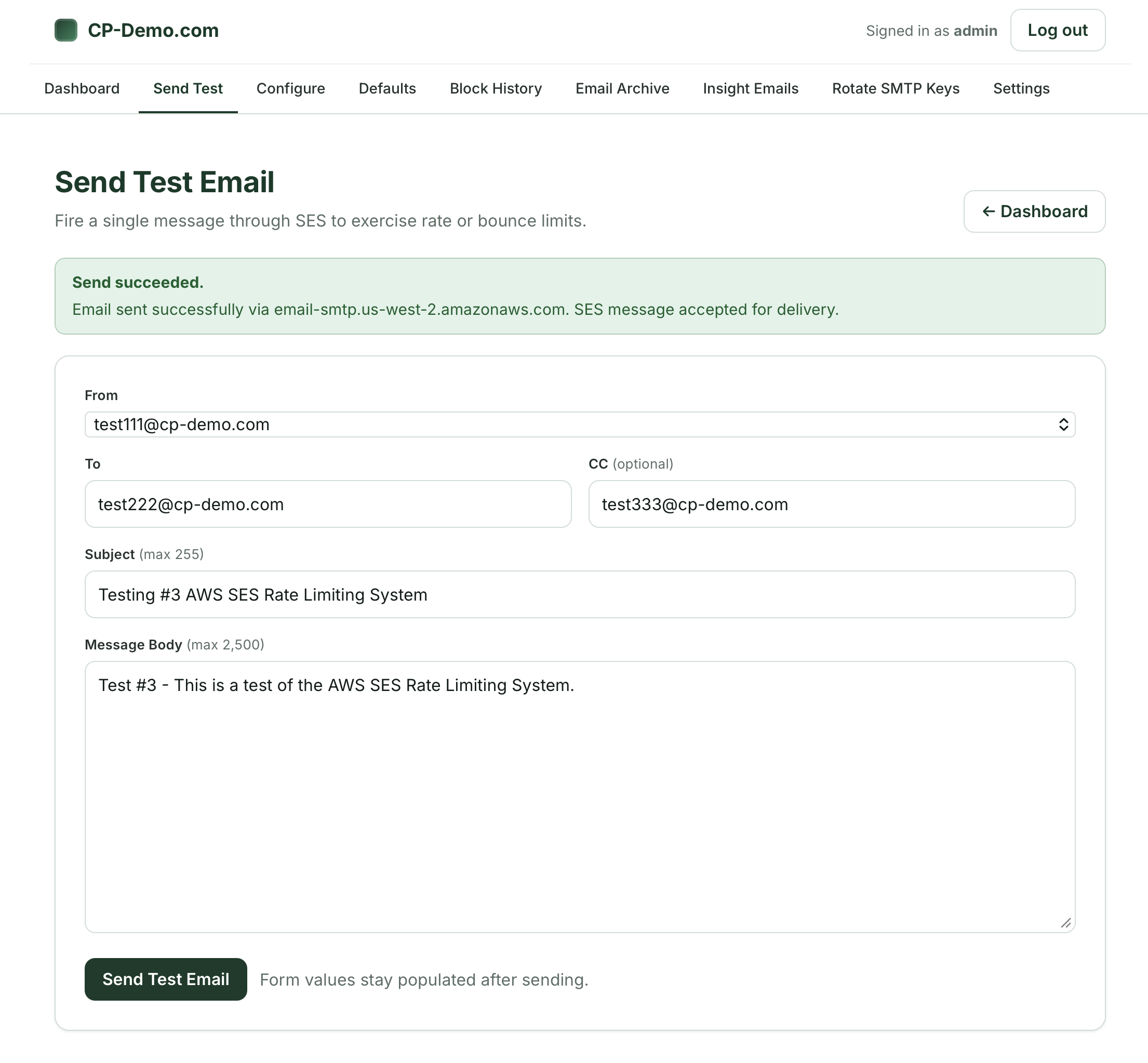
And the fourth attempt (success)
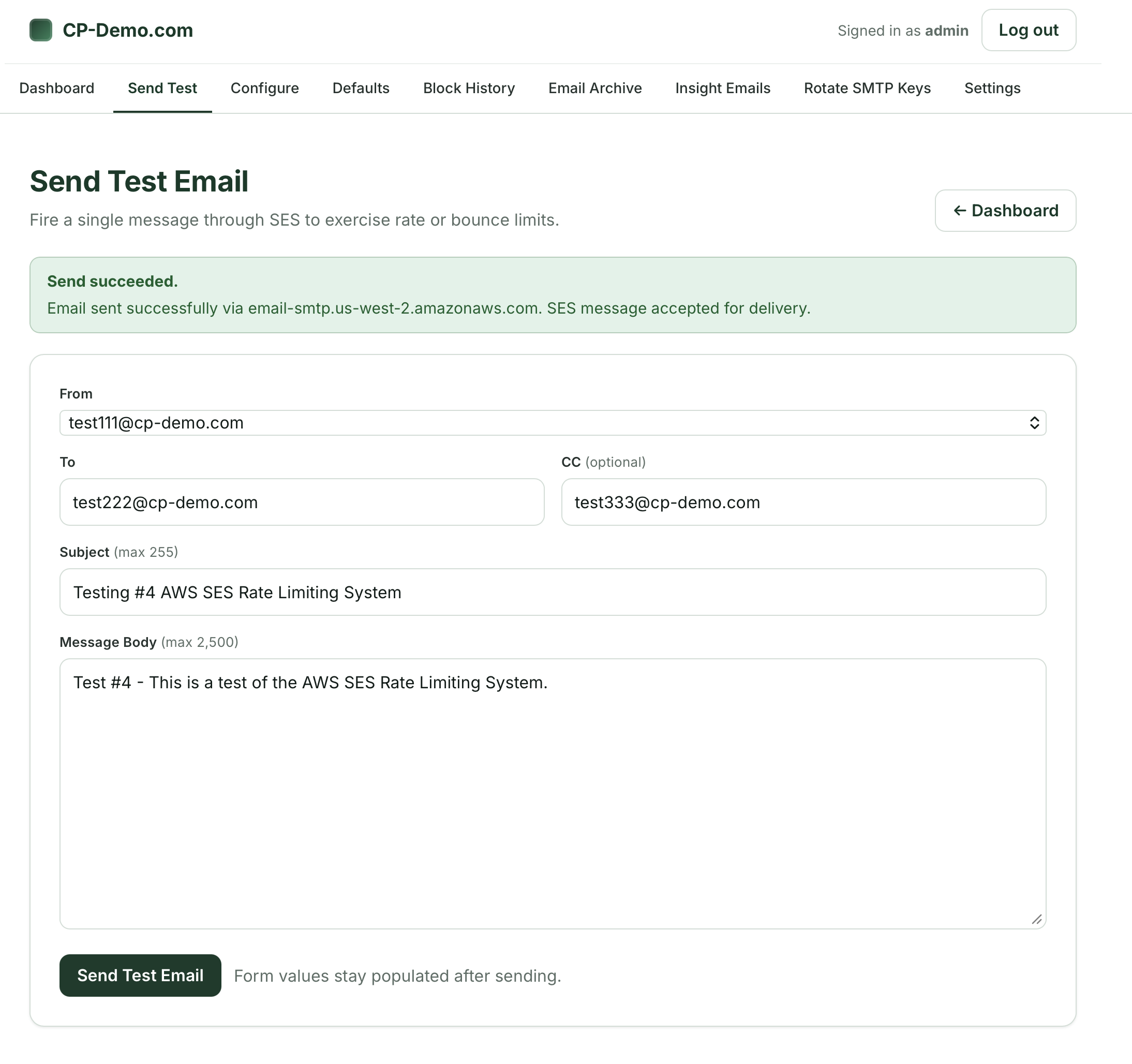
Fifth also went through: (success)
Step 4: Revoking SMTP credentials (blocked)
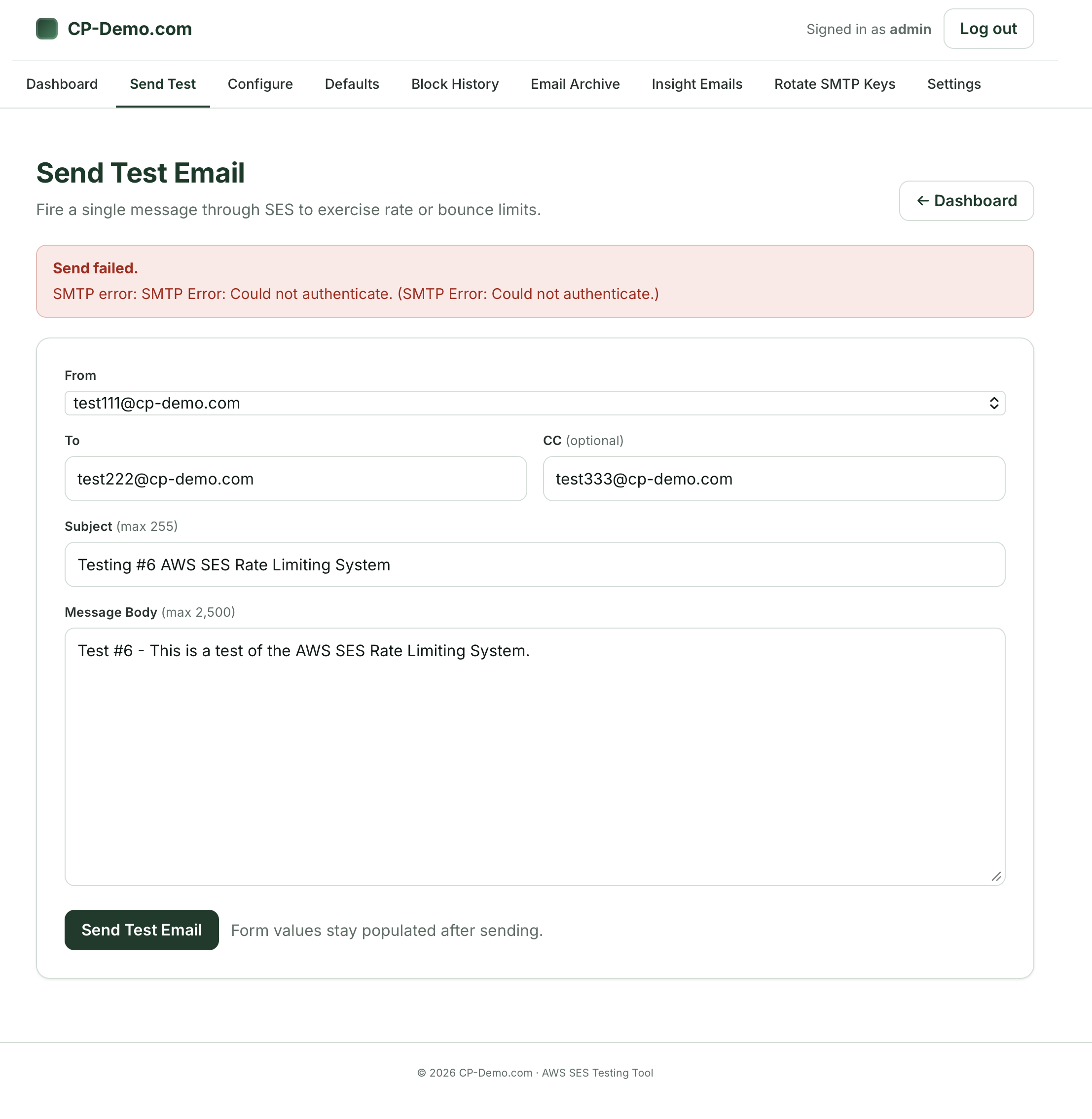
On the sixth try – we are seeing that the system is blocked:
(SMTP error: Could Not authenticate.)
This means that the system is working!
Step 5: Email Alert for Revoked SMTP keys:
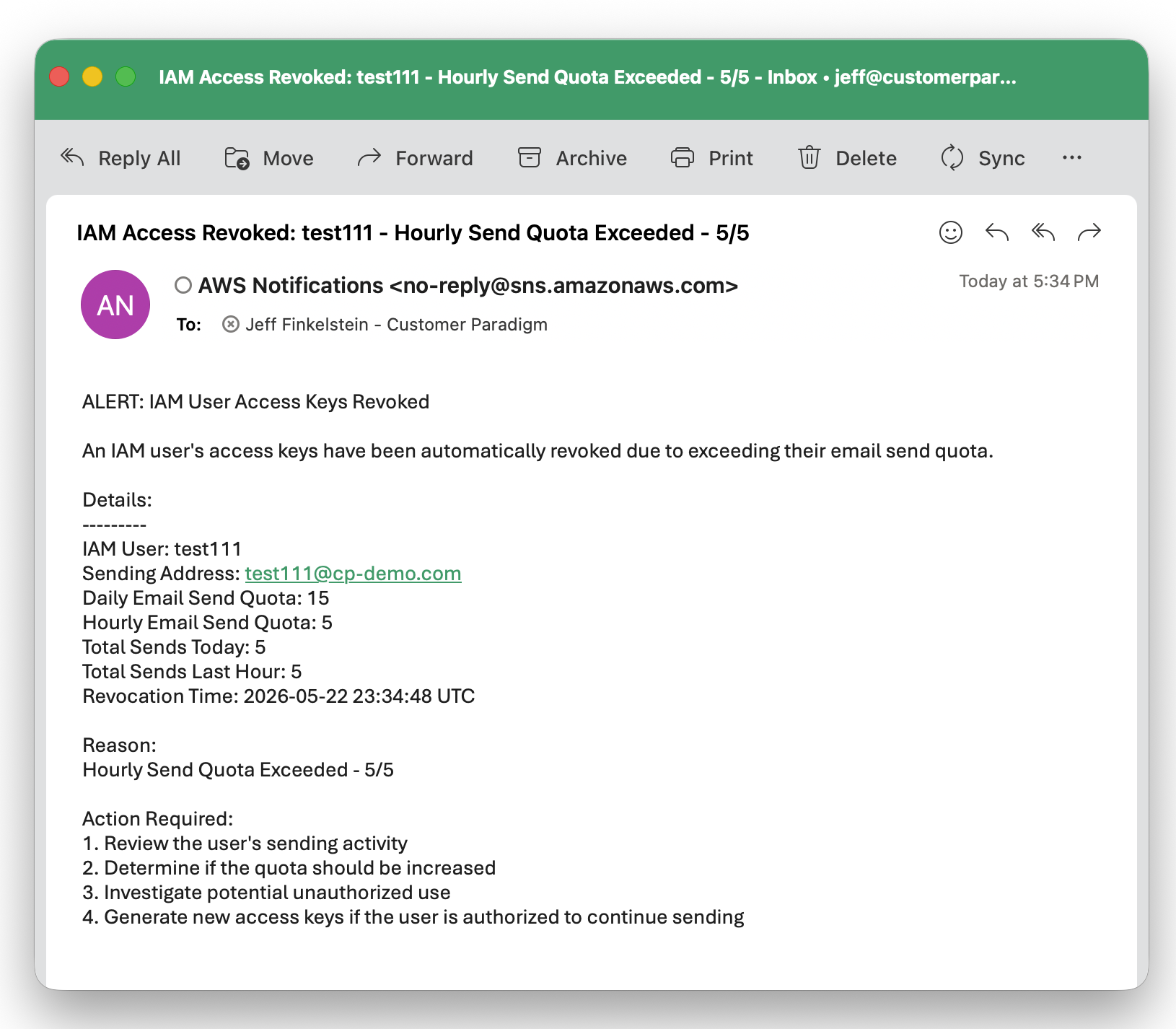
Here’s the email alert I received from AWS, letting me know that the system pulled the keys and revoked access:
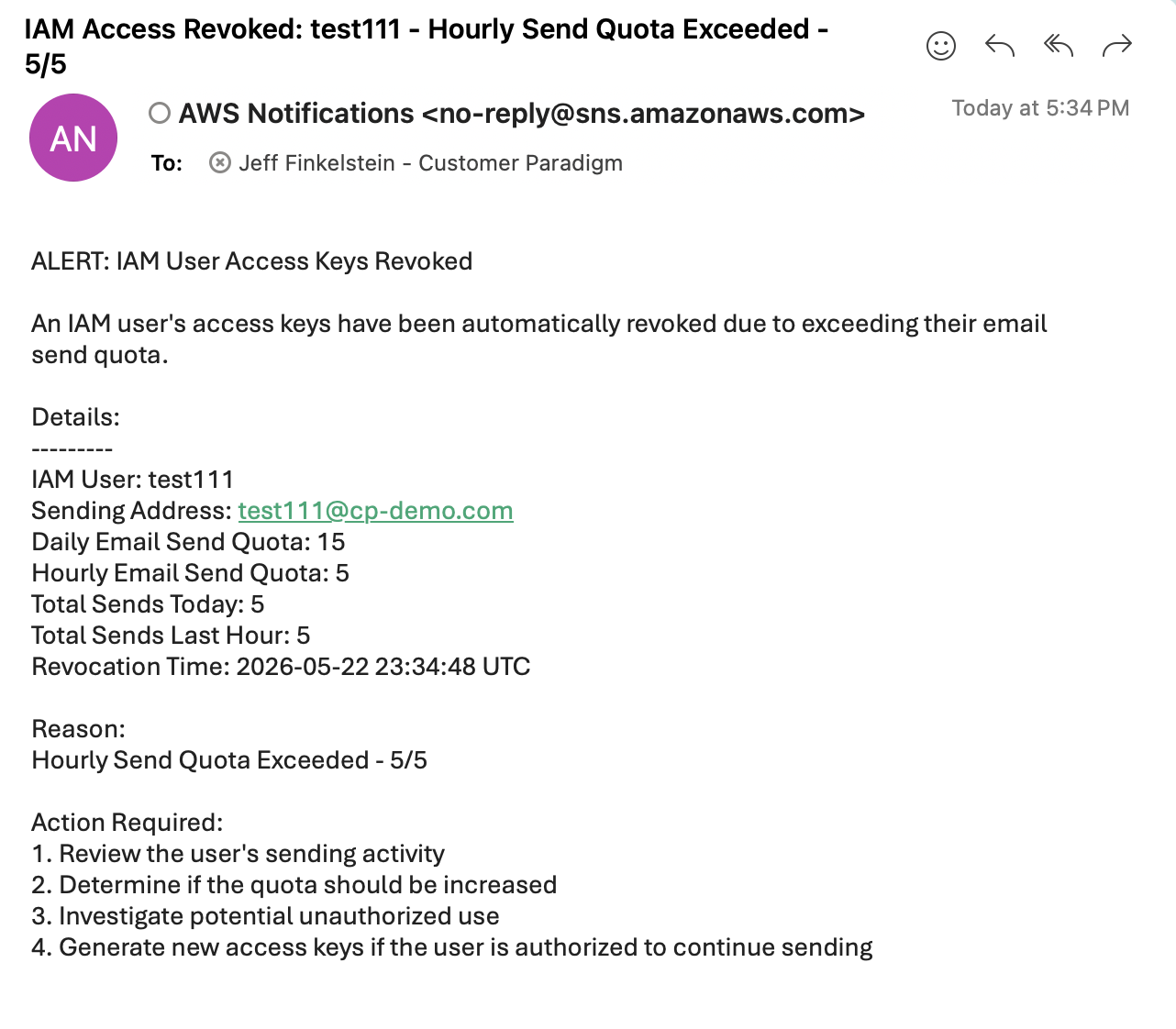
(Note: this comes from AWS – not from your SES system, so this alert will not be blocked, even if SES is completely shut down or unavailable.)
We’ve set it up so you can see the key fields so you can take action:
- IAM user
- Email address that the system was sent from
- Daily email send quota: 15
- Hourly email send quota: 5
- Total sends today: 5
- Total Sends last hour: 5
- Revocation time
- Reason: Hourly Send Quota Exceeded – 5/5
Step 6: Rotate SMTP Keys:
Within the portal, you can go in and rotate the SMTP keys for the email account that was just blocked.
Simply select the IAM user – in this case, it’s test111, and the rotate the key:
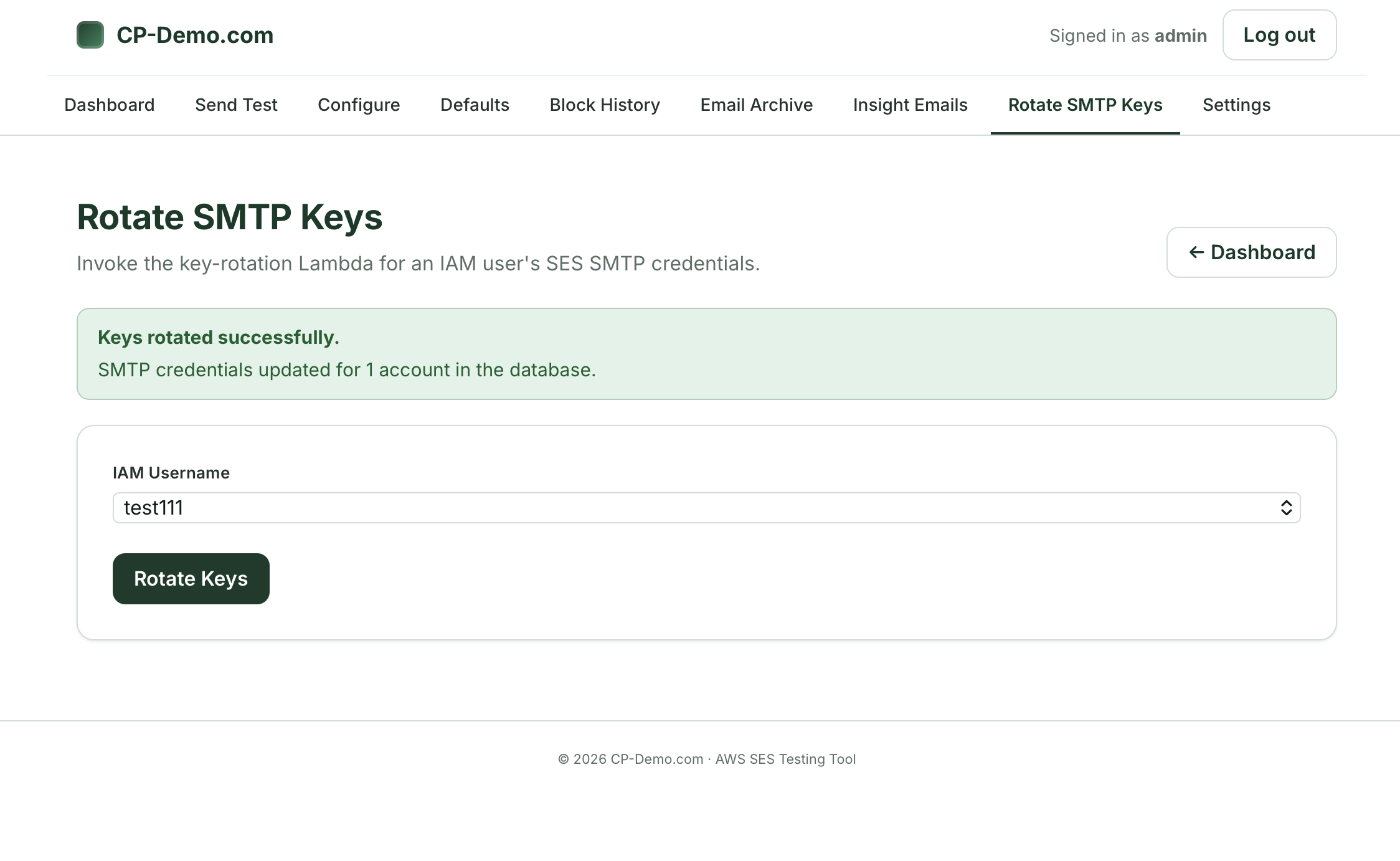
This will then re-create the SMTP username and password and unlock it.
The new username and password will be displayed on the screen so that you can update your application that is sending the outbound email.
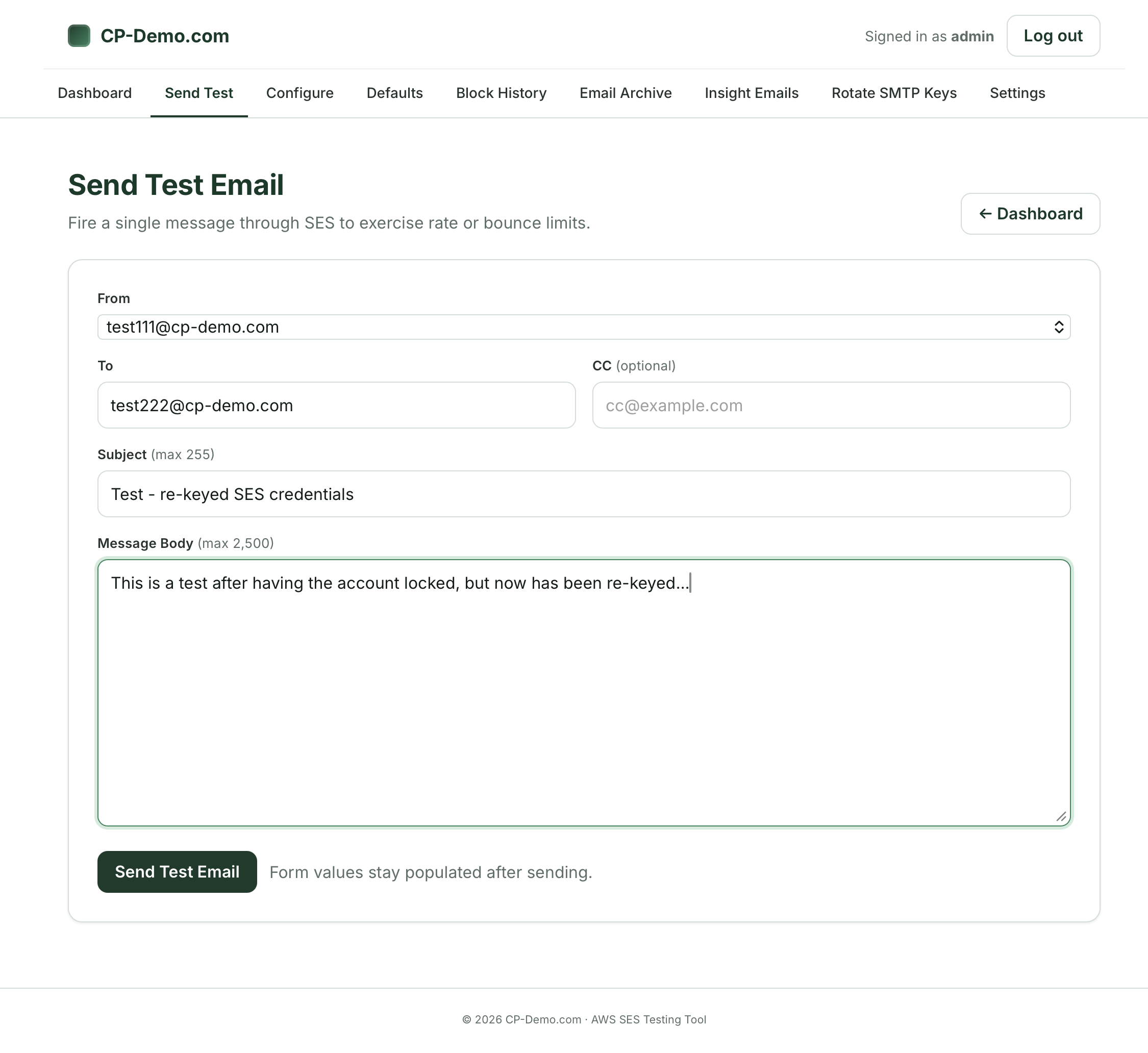
Step 7: Send Test Email After Re-Key:
After you’ve re-enabled the email account in the portal with new credentials, you can try testing the ability to send again through the system:
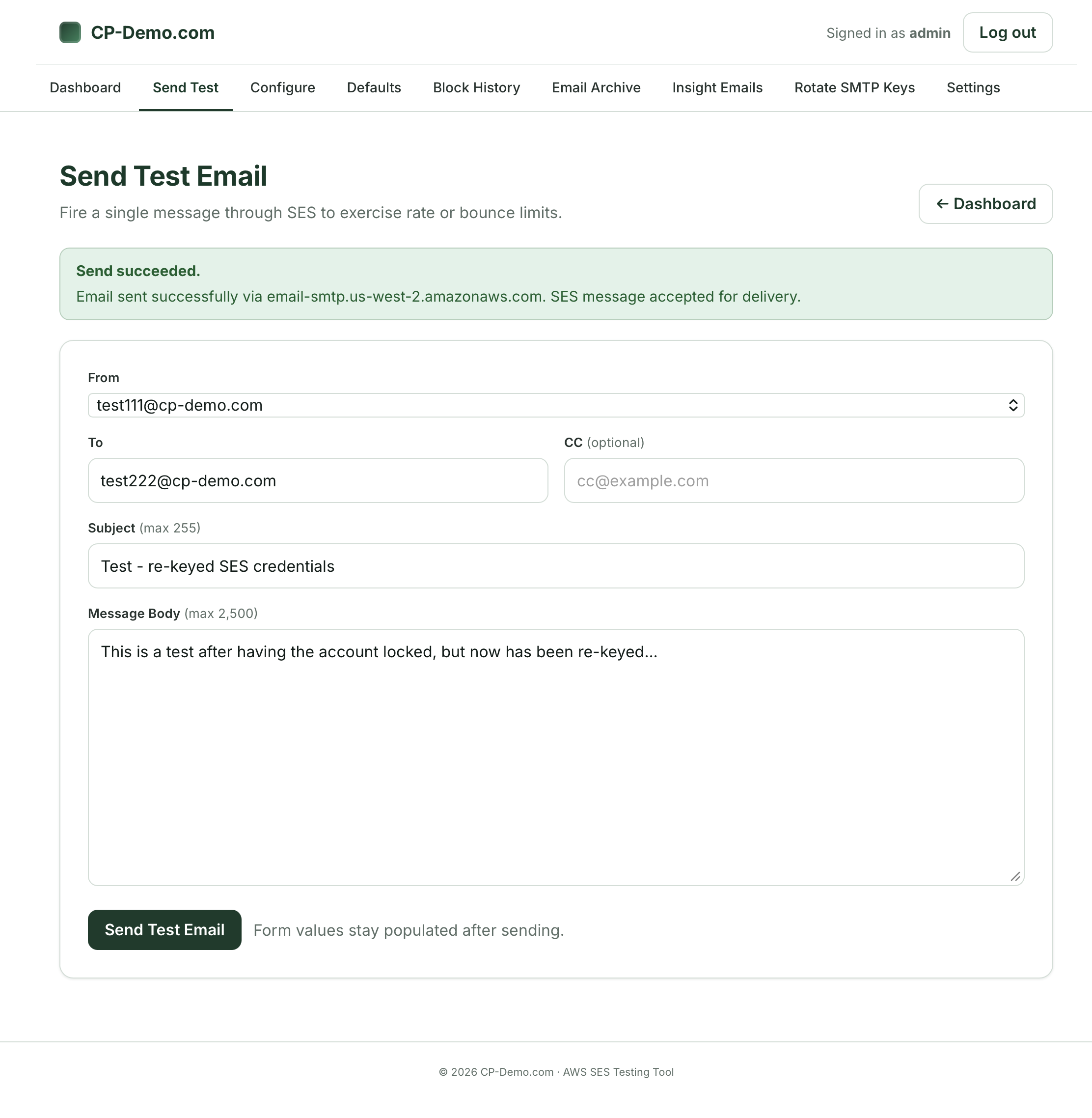
Success! This test shows that you’re able to re-send, right after resetting the email address credentials:
Step 8: Configuring Email Addresses for Rate Limiting
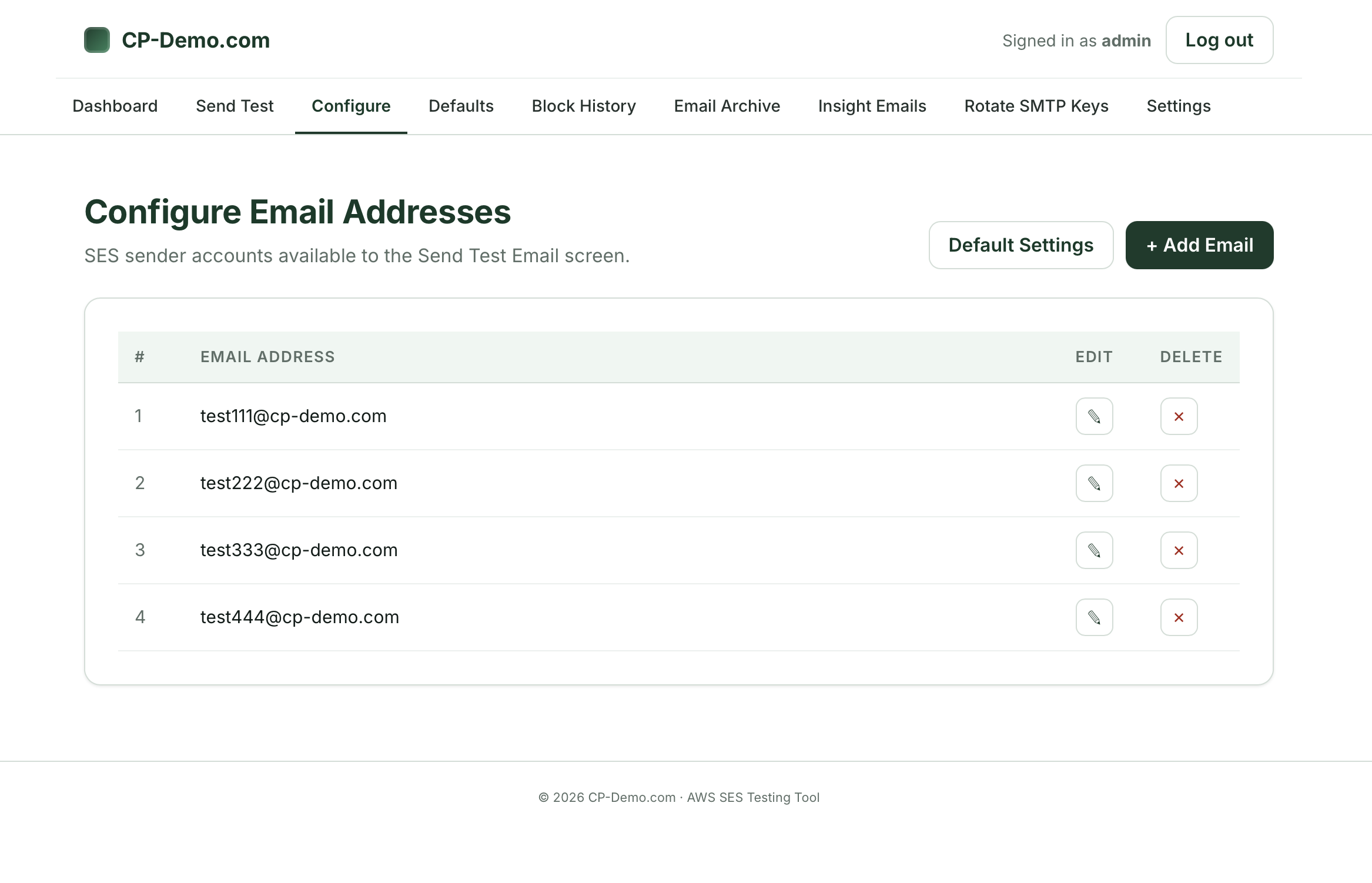
While you still need to go into the AWS SES system to create a new email address and verify that you have access to it, we have an easy way for you to set the bounce and rate limits for sending email in the portal.
You don’t have to set each one – you can simply have a default setting that controls all of the emails going through the system. But for ease of use, we’ve found that it’s better to have different limits for higher-volume systems and applications set differently.
On this page, you can:
- Add a new email account to the system
- Set Default settings
- Edit an existing configuration
- Delete an email account’s settings
- Daily Send quota: this is how many emails the system will allow the particular account to send each day (12:00 am – 11:59 pm). In this test example, it’s set to 15. Way too low for a live production system, but great for testing the limits of a system.
- Hourly Send quota: this allows you to set how many emails can be sent out each hour. In this case, the test system is set to only allow 5 emails per hour.
- Daily Bounce quota: this allows you to set a limit of how many bounces the email account is able to send (12:00 am – 11:59 pm).
- Hourly Bounce quota: This allows you to set a limit of how many emails are able to bounce from the email account before you yank the credentials.
- Here’s why this is important: One of the first things you’ll see when an account is compromised is that the attacker will try to send to hundreds or thousands of emails right away. Typically, the list that the send to has a lot of older, out of date email addresses that bounce right away. I usually recommend that the daily and hourly bounce rates are set low – not to 3 – but to something more reasonable. That way the combination of hourly bounce rates and hourly sending limits will stop things quickly before they get out of control.
- Hourly foreign-language quota: This is still in development and not available in all SES environments right now. But it allows you to see if content is in a different language than you normally receive, so that you can place limits on it.
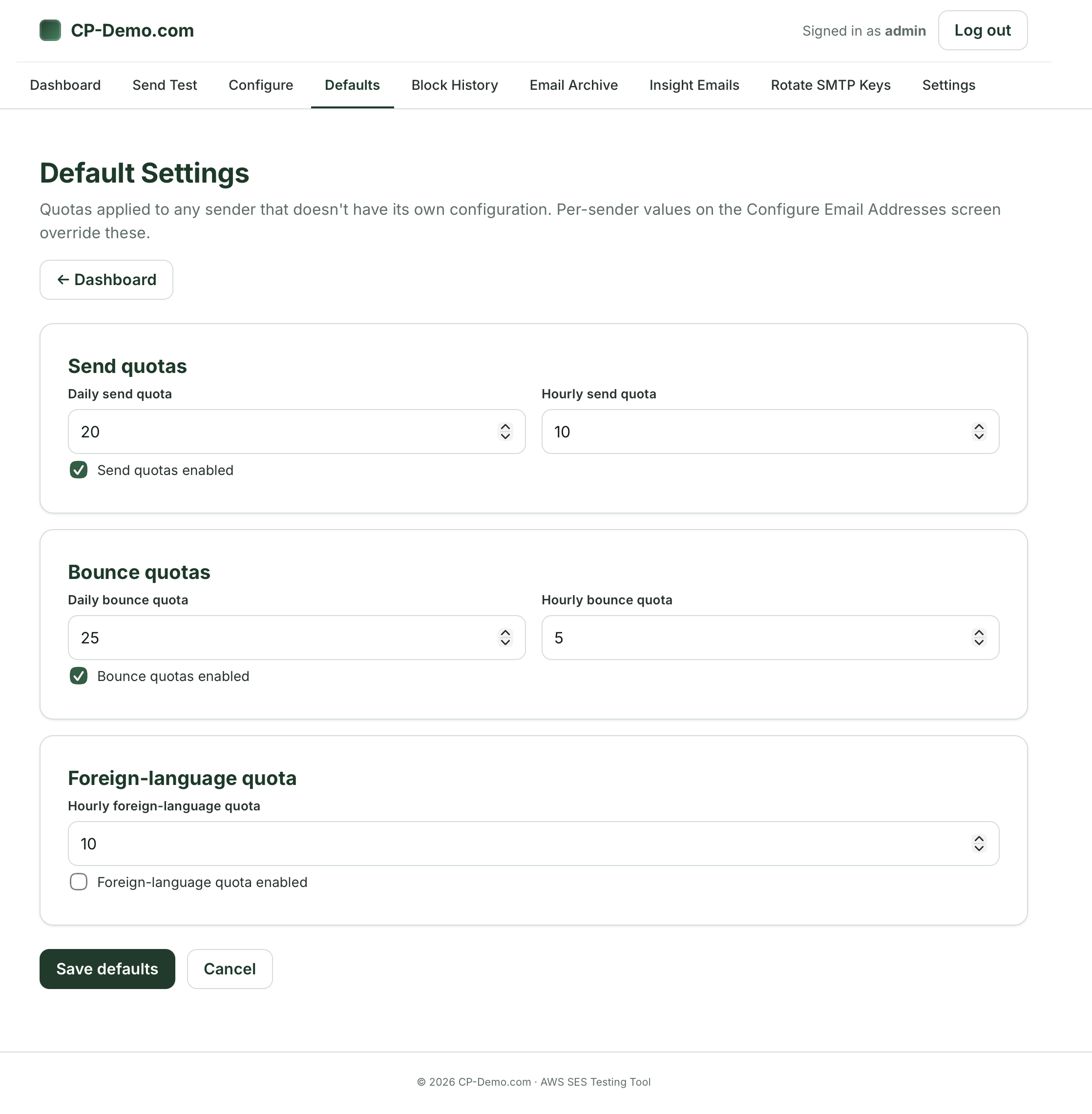
- Daily Send: 20
- Hourly Send: 10
- Daily Bounce: 25
- Hourly Bounce: 5
- Daily Send: 20
- Hourly Send: 10
- Daily Bounce: 25
- Hourly Bounce: 5
- Sender
- Event type (Send, Bounce)
- Recipient
- From date
- To Date
- Free text for message ID, subject, recipient or sender)
Step 9: Edit Existing Email Address:
I find sometimes it’s easier to look at an example that’s been filled out, so we can edit it.
In this case, you can edit the quotas here for the test111 account:
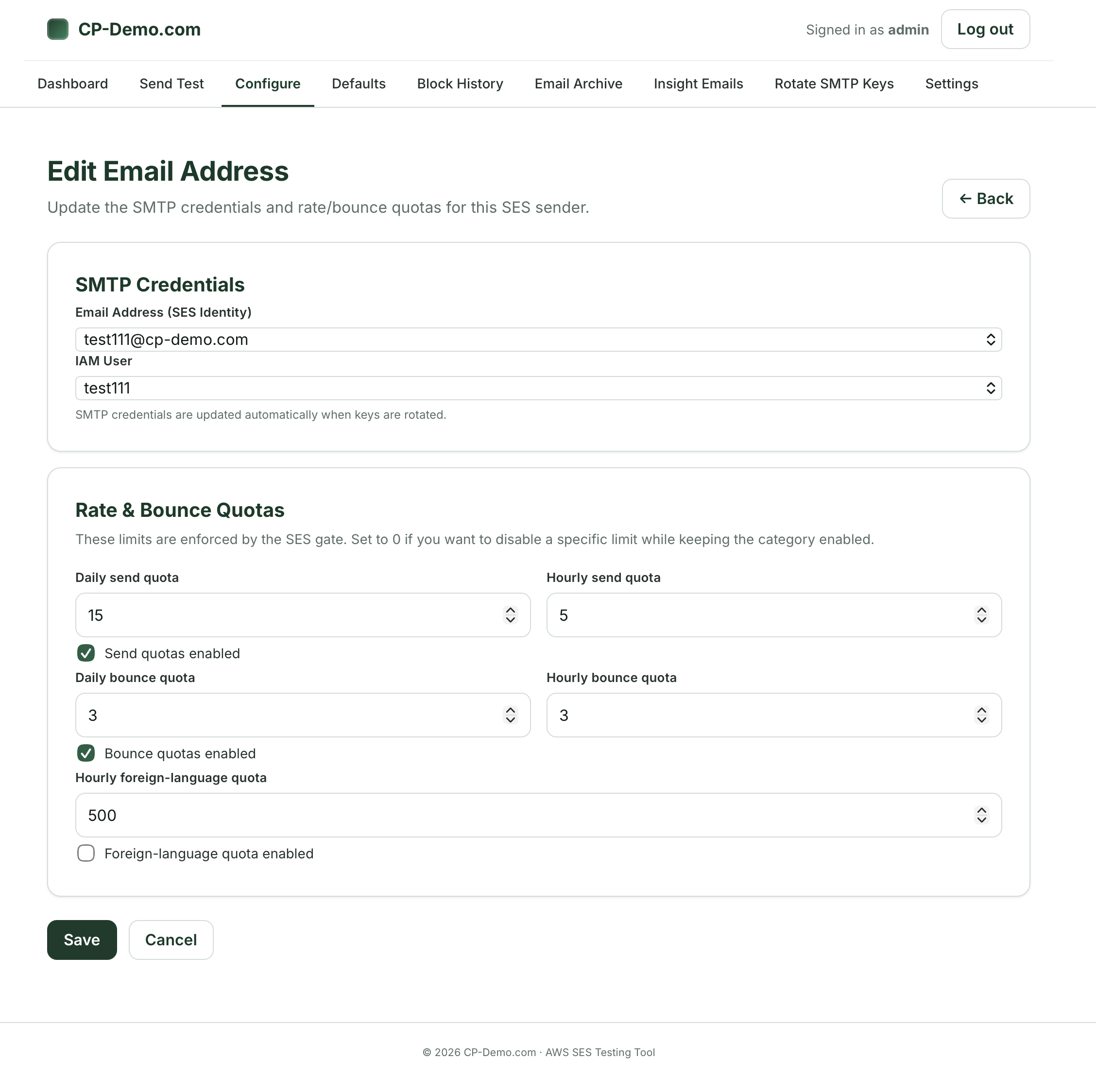
On this page, you’re able to modify the rate and bounce quotas:
Step 10: Configure Default Settings:
If you don’t want to set up every single email address with specific sending and bounce quotas, this page allows you to have a catch-all.
In this case, you can see that the defaults are set to:
Again, these limits are ideal for a test site where you can test and verify that the system is working. On a production system, you’d want to set these a bit higher (or risk having the system revoke credentials if your system is taking lots of orders).
Step 11: Add Email Address / Set up Limits
If you want to register a new SES email address for rate limiting in the portal, you can select the email address and IAM user from drop down menus.
Note: we grab the email addresses and IAM users that work with the system directly from your AWS system:
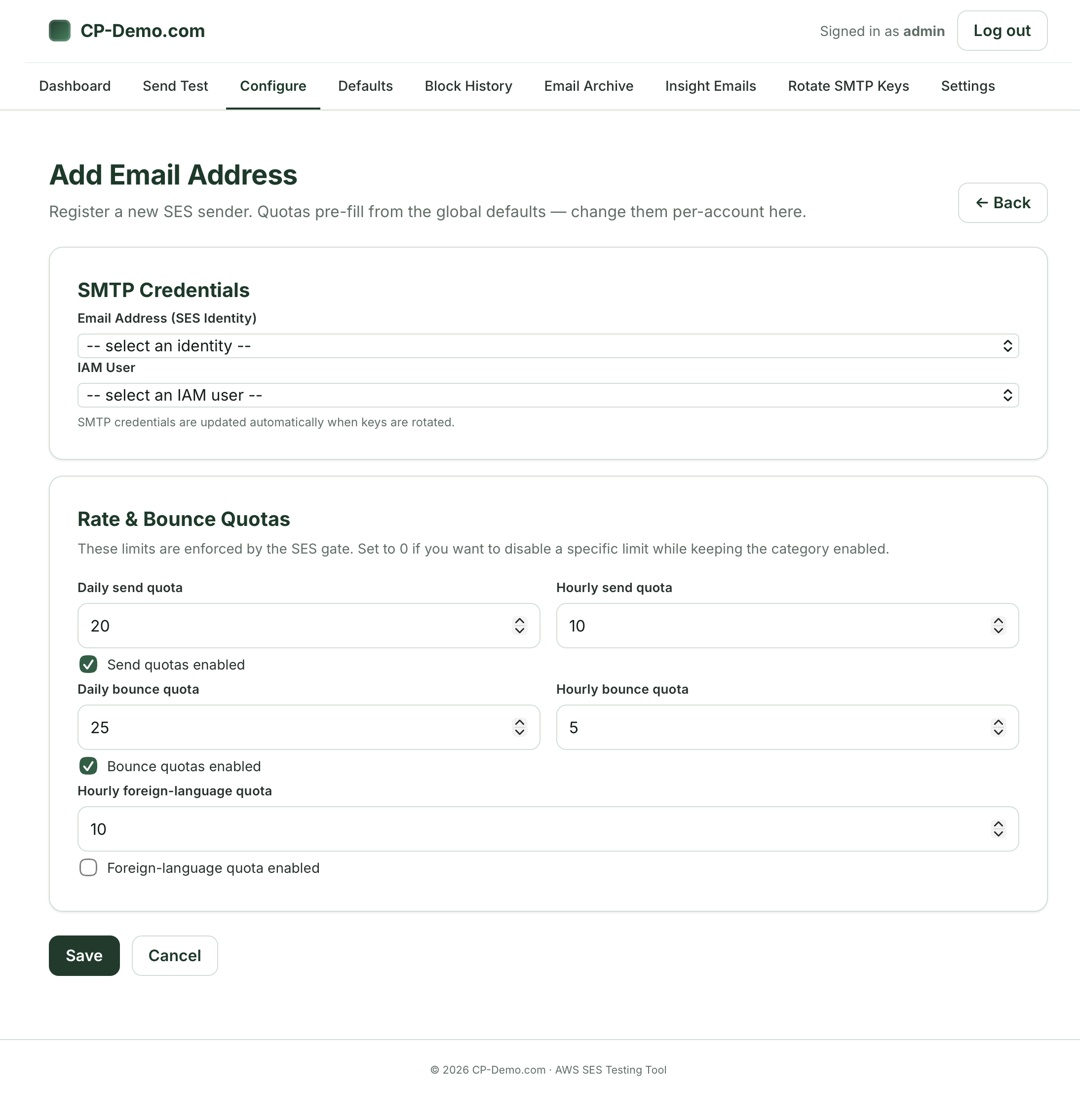
For this test case, I’ve set the defaults to:
Step 12: Email Send Archive:
If you’re like me, you don’t love it when someone at your company calls you to say, “Hey… this important AR invoice didn’t seem to email out to the customer. Can you see if we actually sent it?”
Trying to track this down in the AWS SES dashboard is a difficult process. I’ve banged my head against the wall and the search functionality is… lacking. Instead, I’ve tried to just export a day at a time and then search via an external program. And even better, SES removes the log files after 30 days, unless you pay extra.
We’ve created an easy way to search, but you can also view the information in a mySQL database table that is connected to your SES portal in your AWS system, if that’s easier (it often is for me).
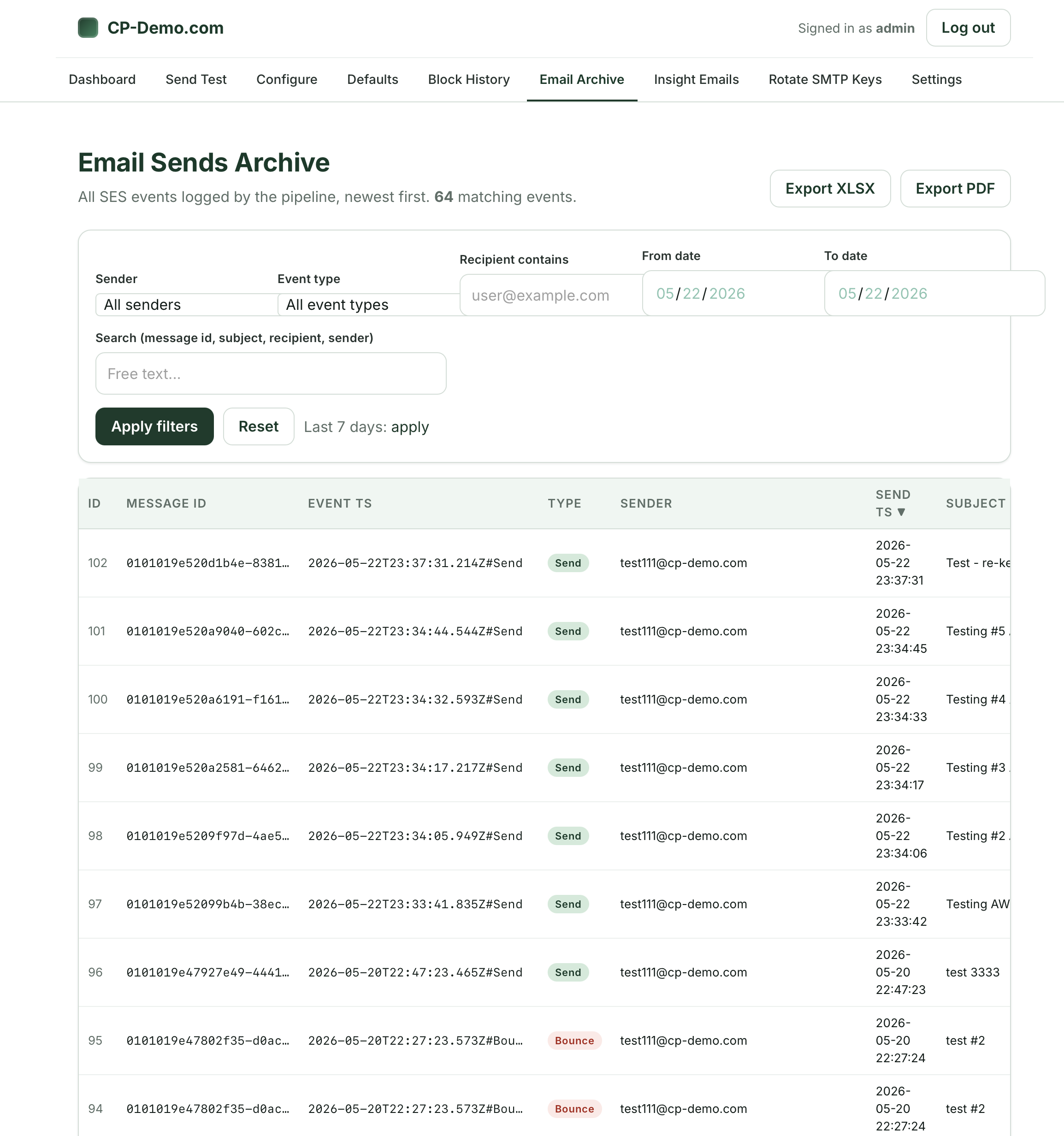
In this case, you can search by:
You can also export this to XLSX or PDF.
You can see the event JSON from the sending system if you need to do a bit more technical troubleshooting:
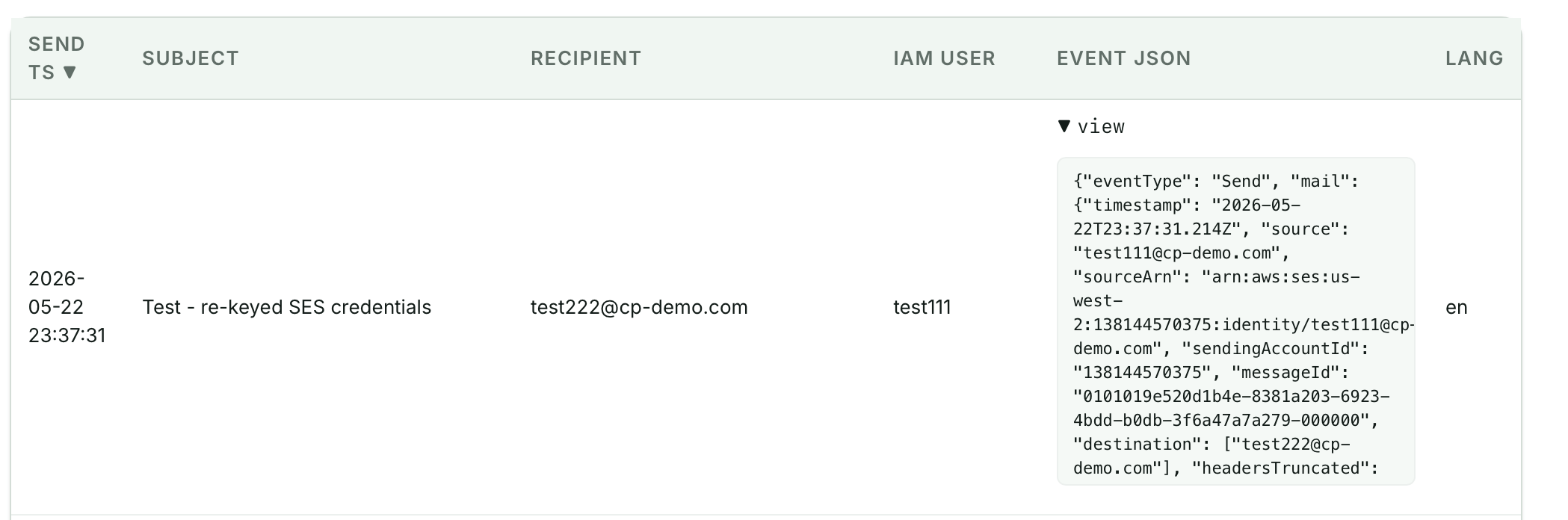
This one part of the SES portal has saved me a lot of time – letting people know that the AR invoice bounced… or that it did send properly at a specific date and time.
Please note: we do *not* save the content from the body of the emails, so you are unable to search by message content. This is done for data protection and privacy, but if you need your system to do this, please contact us and we can customize the system if needed.
Step 13: Block History:
In this area of the portal, you can review the history of email accounts that exceeded specific quotas:
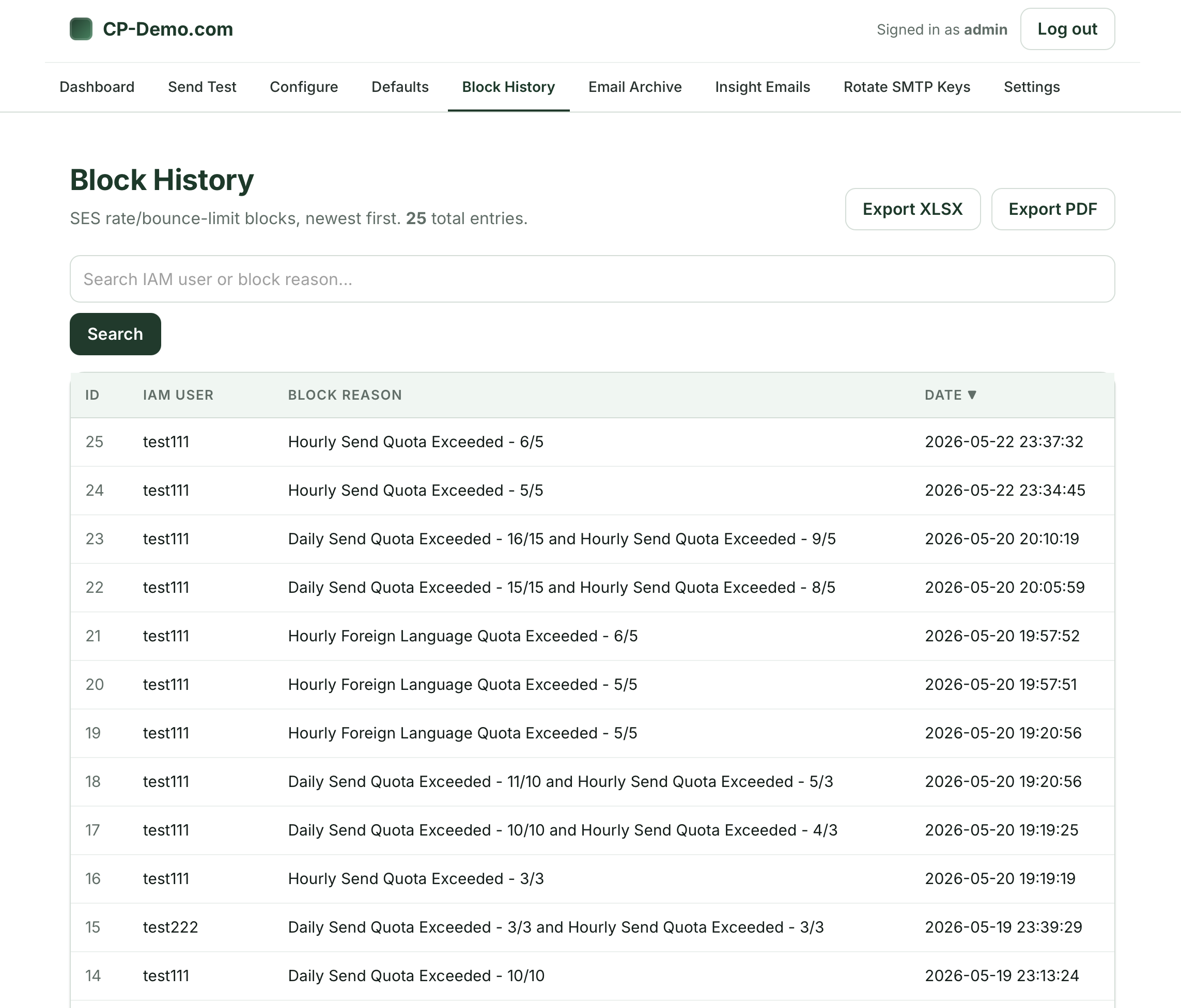
This can be exported to XLSX or PDF, and allows you to keep tabs on what’s happening with the system.
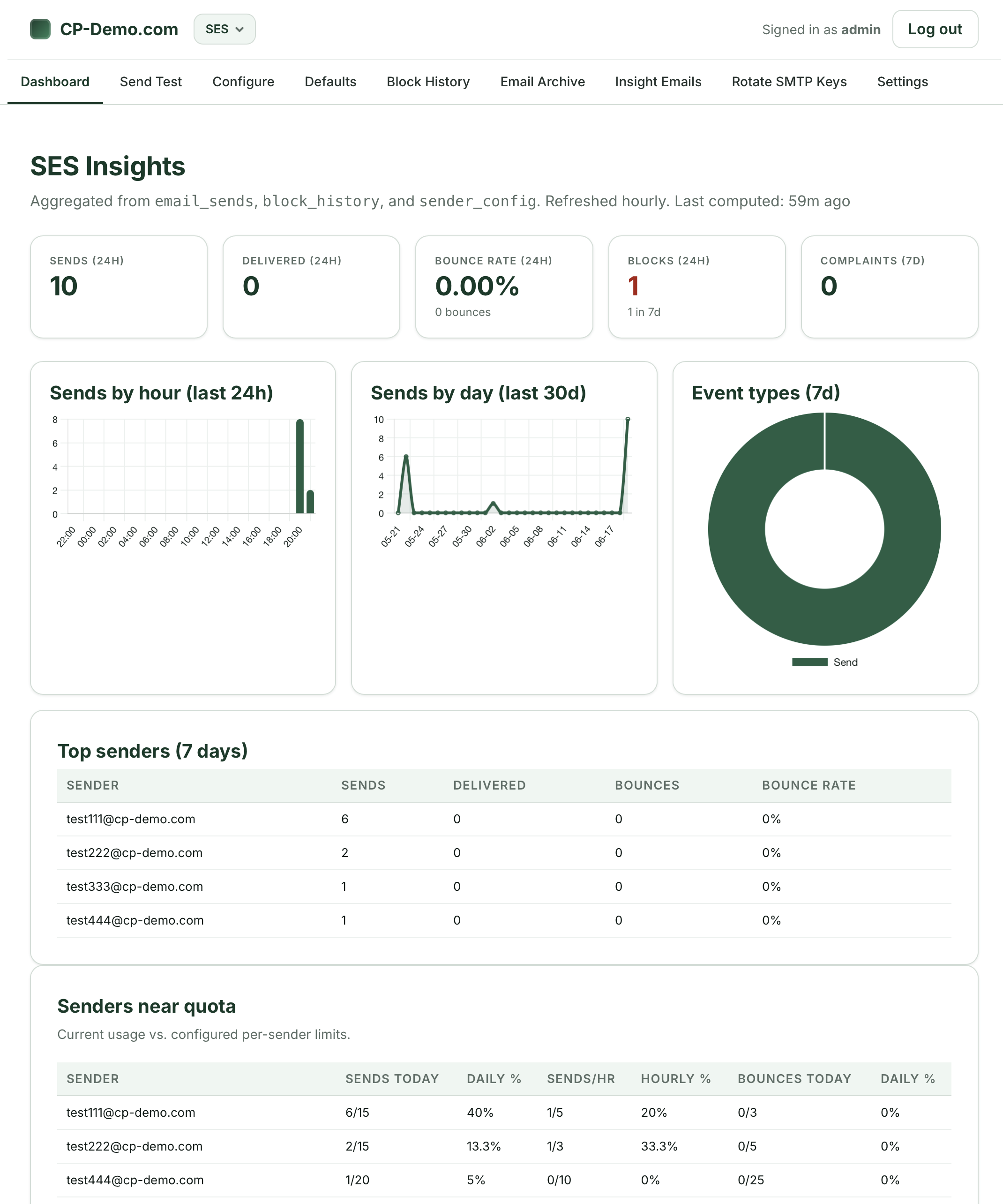
Step 14: Dashboard Insights:
Running in the background of your system is a local AI model that looks at what’s going on with your system and allows you to know how many emails are sent out of your account, what’s been delivered, bounced, blocked or any complaints you’ve received.
All of the insight is run 100% on your AWS server using a python script to generate and produce insights.
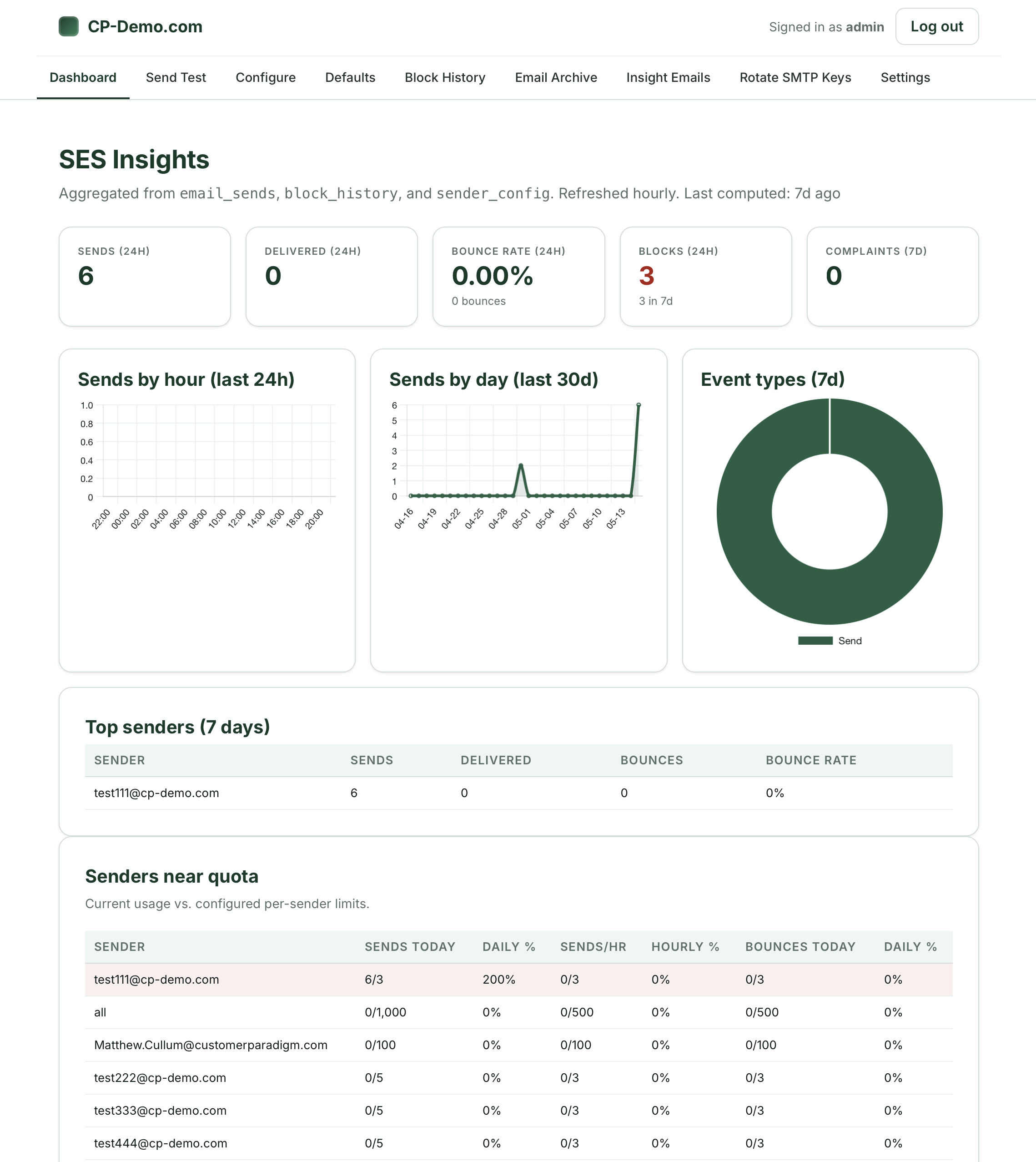
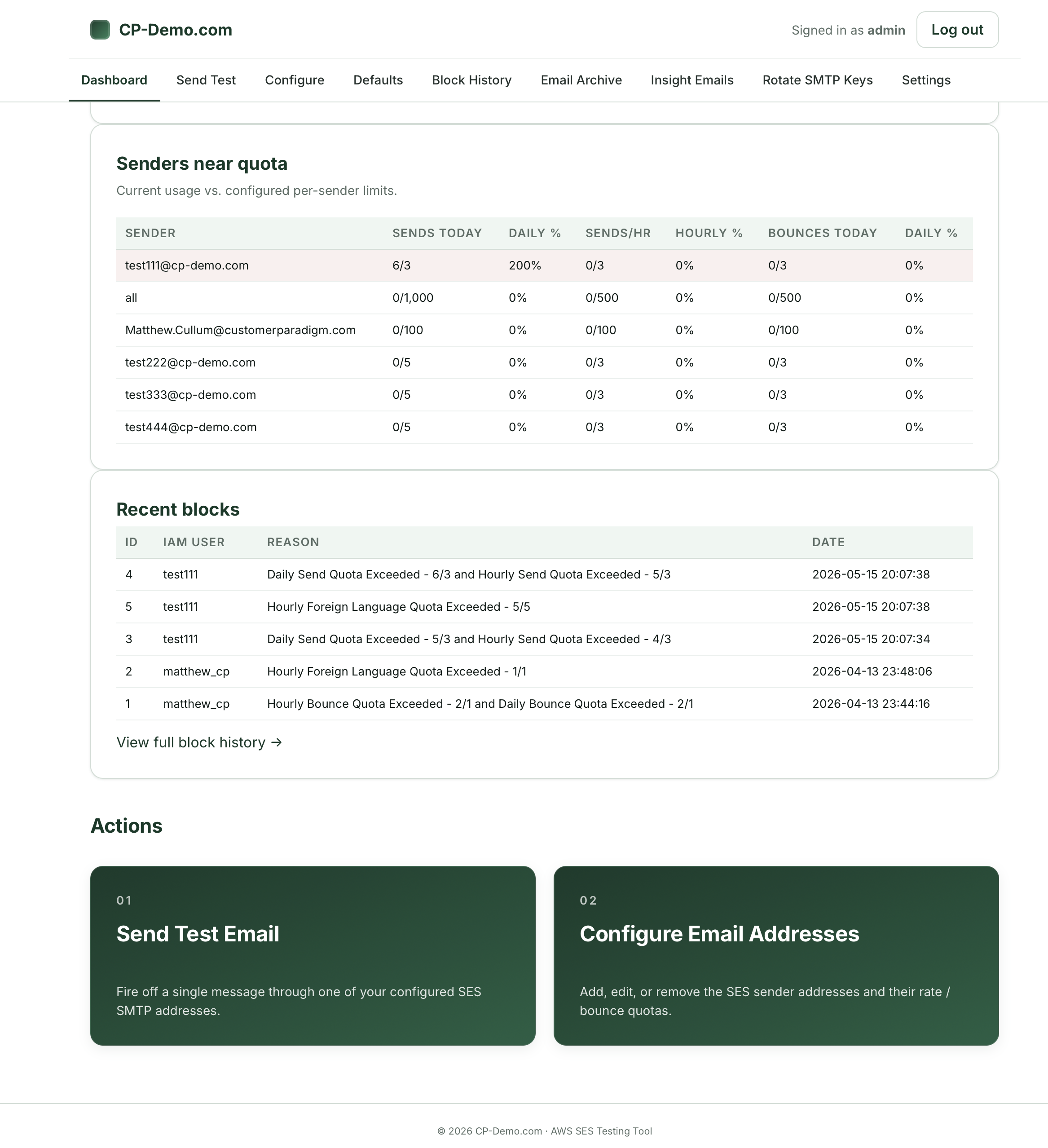
You can see your top senders, senders near their quotas, or recent blocks from the system.
Step 15: Insight Emails:
Yes, I know. An insight email for a system that sends emails. If you’re like me, you probably don’t love your inbox filling up. But at the same time, you probably don’t want to have to remember to visit the portal every day / week to check on the system.
If you do want to receive insight emails, we’ve set up a system that allows you to see what’s happening with the system:
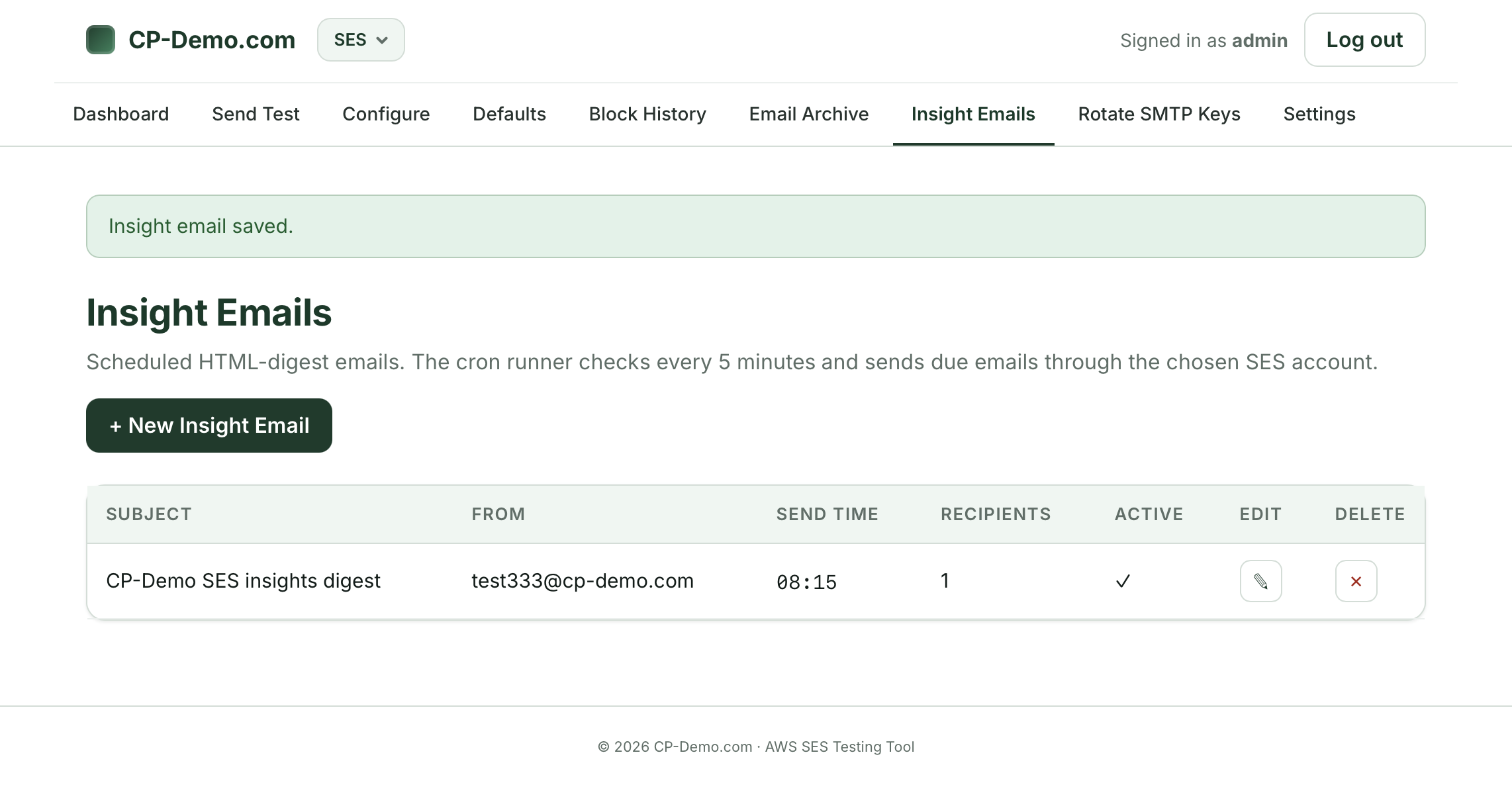
You can set the subject line, from email, to email when it’s sending and how often (daily / weekly / monthly):
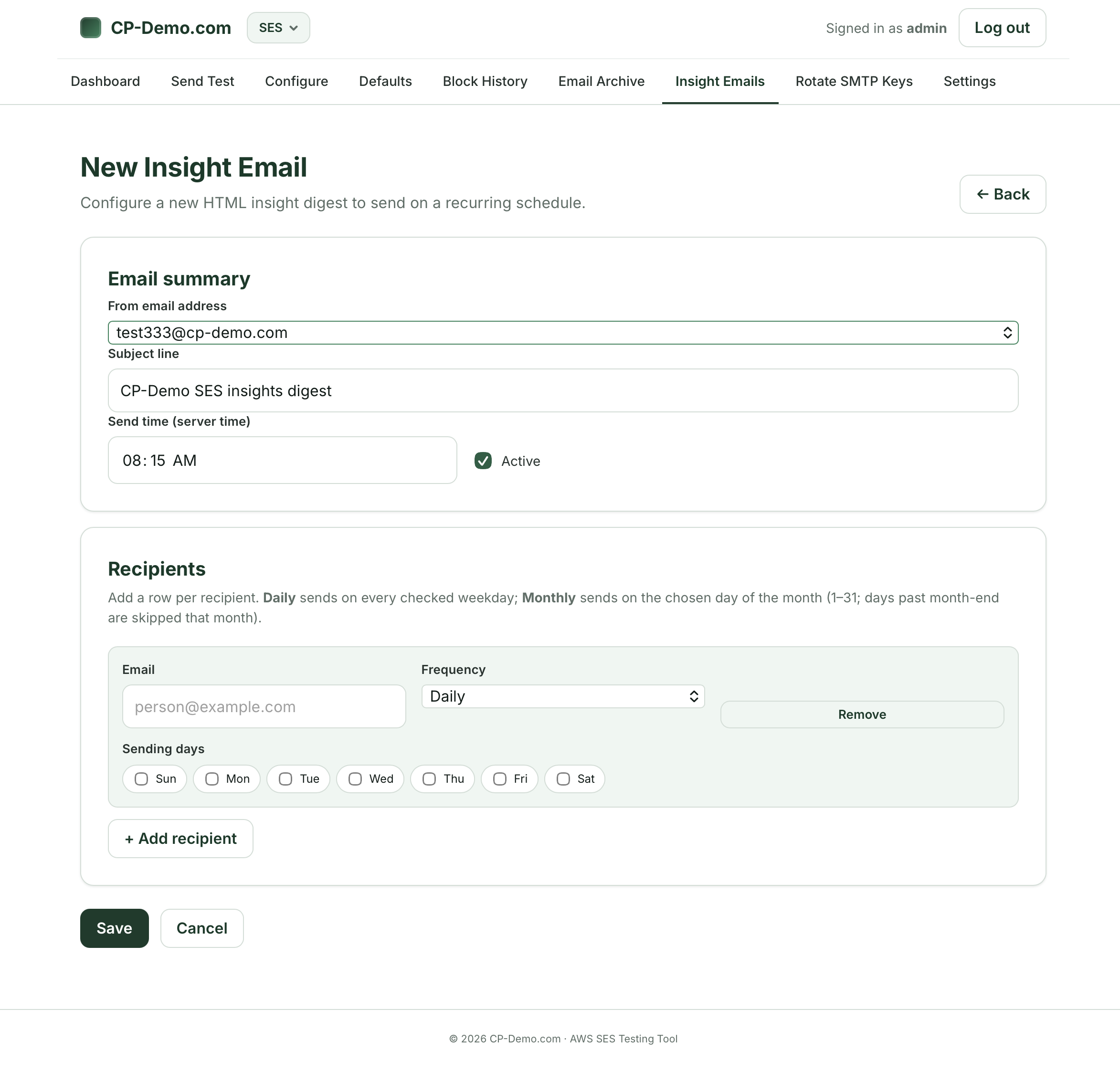
Please note that this system needs to use an actual SES email account, so don’t use one that’s been blocked or revoked.

I’ve been where you are now….
If you’re reading this, I’ve been where you are. Trying to figure out a way to rate-limit your AWS SES system from going out of control and sending too many emails.
Since 2002, our company has completed more than 30,150 web development and marketing projects. So I’ve seen quite a bit. Hacked accounts that start sending out of control or bouncing catastrophically – leading AWS SES to suspend your account. Or, it’s a system that wasn’t configured properly, and starts sending 50 emails every three minutes starting on a Friday afternoon. By the time you notice, your account is over quota and you can’t send anything else.
We asked the AWS SES team. We hired a former senior level AWS solutions architect. We were told that no, AWS doesn’t have any tools that allow you to limit how many emails a specific account can send. It’s one big bucket, so good luck with it.
After dealing with one too many outages, we decided to see if we could develop something that would work, using only AWS tools to track and manage the SES outbound process. After six months of fine tuning and working on it, we’ve developed a system that allows you to rate limit your AWS SES outbound emails, and automatically pull the keys if any specific email account sends out too many emails or starts bouncing too much. We built a self-service portal that allows you to test out the process, and have full documentation for it.
Why are we putting this out there? Because we were really frustrated by not having a solution that would protect our clients. And we can’t be the only ones out there that are affected by it. It would have been easier to keep this as an internal tool and just give it to our clients, but we wanted to turn our experience into something that can help others.
We’ve priced this in a way that allows us to cover our cost of setting up the system, and we have an option for self-service installation in case you’re not able to let us into your AWS infrastructure.

Three Options for Working With Us
There’s three options for working with us:
Option 1: Full service:
We set up everything for you in your AWS environment, including:
- Specific serverless lambda functions
- mySQL database that allow your system to rate limit SES outbound emails
- SES IAM users
- We’ll set up to 10 different email addresses in the system (additional ones at an hourly rate), and test and make sure that you’re able to send from various systems.
- We’ll use the SES rate limiting portal to set you up and allow you to test rate sending and bounce limits.
- We can also help with AWS SES TOS appeals and help guide you through the process of getting an account re-instated.
Price: $1275
Additional hourly consulting: $165 per hour.
Includes: Complete set up of AWS SES rate limiting system, including up to 10 unique email addresses. We will set up the AWS SES portal as well, and walk you through how to use it to test and re-key email accounts. We will include the PDF manual for set up and configuration for your reference, a ZIP file download for SES rate limiting portal, 1 hour of screen share support, 12 months of updates to system. Additional hourly support at $165 per hour.
Purchase SES Rate Limiting – Full Service Now
Option 2: Self service with included screen share support during US hours.
If you don’t want us working in your production AWS environment, we offer a self-service option that gives you the blueprints to put everything into place.
We get it – sometimes it’s not so easy to add outsiders into the system. So we’ve created a do-it-yourself approach that allows you to set up and configure everything yourself. And because it’s sometimes complicated, we’ve included an hour of screen share support where we can help troubleshoot any issues you might have.
Self service option includes:
- PDF manual for how to set up AWS SES rate limiting system in your own environment
- Zip file for setting up the (optional) SES rate limiting portal.
- The portal allows you do configure limits for each item.
Price: $595
Includes: PDF manual for set up and configuration, ZIP file download for SES rate limiting portal, 1 hour of screen share support, 12 months of updates to system. Additional hourly support at $165 per hour.
Purchase Self Service AWS SES System
Option 3: Hourly consulting for AWS SES.
If you just want help on an hourly basis, we can assist you on an hourly basis at $165 per hour.
We can help with AWS SES TOS violation responses, as well as how to secure your system moving forward.
Add rate limiting and bounce detection to your AWS SES system on an individual email account basis.
Ready to Integrate AWS SES Rate Limiting?
Contact us today for help.
Talk to a member of our strategy team today to get started on your AWS SES rate limiting system. Email us or call: 303.473.4400 to talk to a real person right now.

Need help acquiring new customers?
From paid advertising, search engine optimization, campaign management, to website design and coding, we have you covered.
Need help retaining existing customers?
Our retention experts can help you manage social media, email re-marketing, blog and content writing and more!
Need help building customer interactions?
From one hour to one-thousand hours, our developers can craft a unique identity and website for your business.