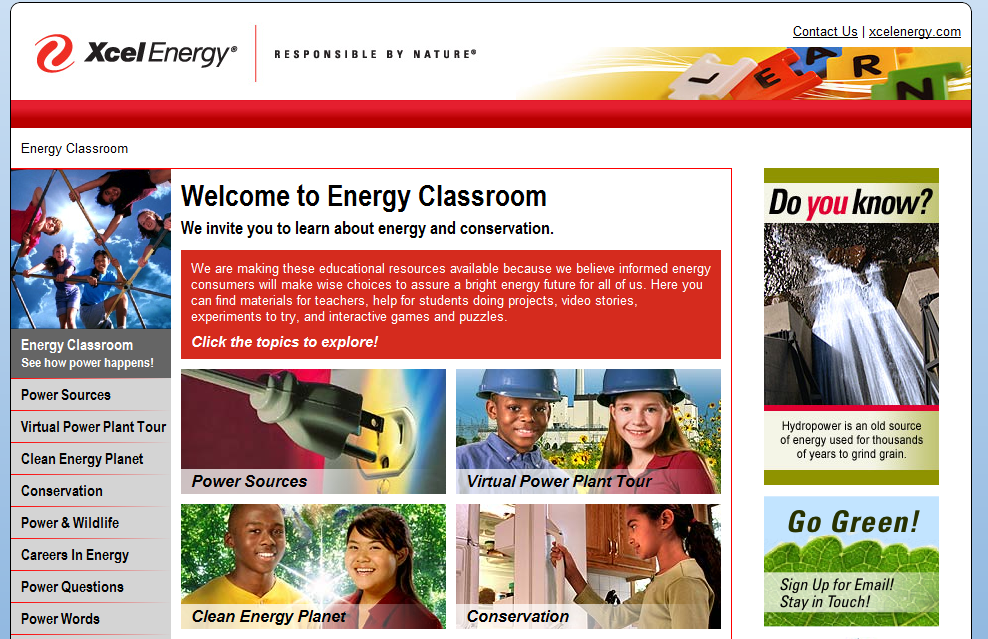
Xcel Energy came to Customer Paradigm with the need to move their Energy Classroom website to a WordPress CMS system. Their new website www.energyclassroom.com assists children as an educational resource to make the next generation equipped to make educated decisions about energy.
With children’s increasing interest in energy sources combined with the need for interaction, Xcel found a need to update their existing website with more graphics and ability for interactions and engagement.
Rollover Image Captions

With children you are never sure where there clicking path may go, and to keep them engaged we provided them with a small caption describing each page in the navigation. This goes a long way in decreasing clicks to pages that fail to provide them the information the user is looking for.
Interactive Puzzles

These interactive puzzles are strewn throughout the site. They work as educational tools for children to help them understand the process and how energy is created. You are also able to take a virtual power plant tour through the website under the Virtual Power Plant Tour category.
Teaching Material

Xcel has done a great job at providing teachers with material to help educate their children about energy and how conservation plays a roll. They created the site with a goal of providing an easy-to-use, effective materials which meet state’s teaching standards. With teachers in mind, Xcel surveyed and consulted with teachers to develop a website which was truly useful.
Xcel understands that many generations take energy for granted, it is their goal to inform energy consumers to make wise decisions for the future and all generations to come.
If you are interested in WordPress Design for your webpage call us now at 303.473.4400 to talk to a real person or fill out the contact form below.
Customer Paradigm had an amazing opportunity to work with Denver Attorney Alan Shafner on his new WordPress site. Alan Shafner has been raised in Denver, Colorado and has been practicing law for over 28 years. In 2011 he opened his own firm, The Law offices of Alan C. Shafner.
Alan Shafner focuses on many types of law, one specialty is Personal Injury Law; he has served a wide variety of scenarios and is equipped with expertise to handle your case. His personal injury law ranges from Colorado auto accidents to medical malpractice law.
Alan Shafner also focuses on fighting against elder abuse and abusive nursing homes. There can be many reasons for elder abuse in a nursing home; many are due to under-staffing, poor training methods, employees with violent histories or even neglecting to properly care and maintain the facility.
Shafner Law also handles commercial truck injuries, often there are multiple liable parties. There are many aspects associated to a commercial injury such as medical bills, insurance costs, representation, experience and resources. If you have been involved in a commercial truck injury Shafner Law is the Attorney for you.
For more information on website design or SEO Services please contact us or call us at 303.473.4400 to talk to a Real person.
When an interior designer collaborates with a website designer, the experience can be nothing less than thrilling. Julie Thornton owner of Thornton Design has been creating homes and business locations with the clients’ insights and aesthetics in mind. She has been working in Boulder and Denver Metro in the interior design industry for over 25 years working from the base of architectural design, to the last pieces in the backyard. She is known for her impeccable eye for bringing a room together down to every small detail. Her clients rave that having the opportunity to work collaboratively with Julie Thornton is an experience in its own.
Customer Paradigm’s Website Design team worked to build her a customized website in an afternoon. She knew that she was looking for something with a bit more customization, and we were happy to complete her vision for her website. Now Julie Thornton is able to receive new client leads through having a presence on the internet. She has also taken advantage of Customer Paradigms SEO services and is gaining a presence on Google relevant to her industry.


If you are interested in learning more about Customer Paradigms Website in an Afternoon or SEO Services please contact us or call a real person at 303.473.4400.
In 2012, search engine optimization for ecommerce websites should start before the websites are even built. Updates to the search rankings algorithm associated with Google Panda and the rise of the social graph have made landing page hierarchy, usability, conversion rate, social engagement, and unique content more important than ever. Here are a few ways that you can get a head start on SEO for your ecommerce site.
Well-optimized product category pages are the most important SEO tool at the disposal of ecommerce websites. In 2012, Google and other search engines have placed a premium on unique, query-relevant content as a rankings factor. For sites that sell a variety of different products and services, creating targeted landing pages (pages created for the purpose of attracting a specific type of visitor) oriented around a keyword or group of keywords is critical to expanding search volume.
An ecommerce website selling snowboards, snowboarding gear, and accessories, for instance, may want to start organizing the site for SEO by dividing their products into broad categories that make sense from a user perspective. Dividing snowboards, snowboarding apparel, and snowboarding equipment are easy decisions from a user perspective, and allow for the creation of custom landing pages that attempt to engage the broadest search terms. Pages optimized for broad search terms, however, can’t hope to engage all of the more specific branded, product-type, or longer-tail search terms that your potential customers may be using to try and find the products that you sell. If you don’t optimize for more specific searches by creating more custom landing pages, you risk letting their business go to a competitor.
To gain insight into how I might organize my broader snowboard category, I consulted the Google Adwords keyword research tool. Here is my initial search:
This search tells me how to organize my snowboard category. I can see that the highest volume searches are for snowboards by brand. K2, Burton, Salomon and others get by far the most searches. I know that I want to create custom landing pages for each of the major brands of snowboards that I sell, to draw in users searching for a specific brand. The second most searched metric seems to be “sale snowboards,” “discount snowboards,” or even “$150 snowboards.” This tells me that I want to create a category page with unique content and products that are on sale, to engage these search terms. Third, it tells me that the potential customers of my theoretical snowboard store are searching based on gender and age. “Kids snowboards” and “women’s snowboards” are popular search categories. So, I will want to create custom landing pages for kids, mens, and womens snowboards, to engage this search volume.
I’ll repeat this process for my Apparel and Accessories categories. So, after about an hour considering my business and some help from Google Adwords, I have a basic structure for organizing my ecommerce site. Here’s what I have:
Obviously, there is more research to be done and more variables to be considered than overall search volume, including competition, conversion rates, and profitability of different products, but you get the idea: Organize your site into categories and sub-category pages that makes sense from a common sense, usability perspective as well an SEO perspective.
*A note of caution: There are made-for-seo sites and made-for-seo sites. Creating a large number of landing pages to engage too many variations of similar keywords can hurt your site from a SEO perspective because you run the risk of duplicate content penalties, and hurt your usability (which also affects your search rankings) because it can create a bewilderingly large number of pages selling similar or identical products. Finding the right balance between SEO and usability is important, but error on the side of usability.
Here is a real-world example from our experience at Customer Paradigm:
Customer Paradigm does internet marketing and SEO for Discount Decorating, a large online retailer of wallpaper and wallpaper borders. In order to increase their organic search traffic, we built out their category and subcategory pages by creating static urls for pages that had previously been internal search result pages, and added unique content and meta data to most of the new category pages we had created. The new category pages allowed Discount Decorating to rank well for a wide variety of more specific and long-tail keywords. The impact was immediate and dramatic. Within two weeks, Discount Decorating’s organic search traffic had doubled, and sales jumped at a corresponding rate. Here is their traffic graph:
In 2012, the key to ranking well for Google and other search engines is uniqueness. This means each of your category and product pages should have unique text, images, schema.org or RDFA tagging, header tags, title tags, alt text, etc. Pages with duplicate content, meta descriptions, or title tags can negate the SEO value of your pages, and category page text or product descriptions copied from a manufacturers website can be very harmful. Search engines aren’t impressed with content that they can find elsewhere, and they may penalize you for it. You have to add something new and unique to climb up the rankings.
One great way to add uniqueness to your website as a whole is through a regularly updated blog. Include special offers, news, how-to guides, and other information relevant to your business and industry. Regularly updated content tells Google and other search engines that your site is an organic, growing site that is regularly adding unique content for its users. The search engines will reward you accordingly.
Not only is the usability of your site critical to your conversion rate (the % of people who visit your site who make a purchase), Google and other search engines are using increasing sophisticated ways to determine whether or not ecommerce sites are usable and using this analysis in their rankings calculations. Things like bounce rate, time spent on the site, number of pages viewed, and engagement metrics such as whether or not a person filled out a contact form, signed up for a newsletter, or made a purchase account for a significant portion of the search engine rankings algorithm in 2012.
The undisputed most important element to usability for ecommerce websites, particularly larger ecommerce websites, is the search feature. Almost every ecommerce site that sells more than a few products has a search tool that allows visitors to quickly find a product based on a series of custom filters. How quickly and with what precision a user can find the product they’re looking for often determines whether or not a visitor becomes a customer, and can go along way in determining the success of failure of an ecommerce site. Careful thought and attention must be paid to your search/filtering features.
*A note of caution: Many site owners and developers rely too much on search tools and other custom filters and ignore or under-develop their category pages. While search tools are great from user perspective, they don’t gain the SEO value that comes with category pages that have unique content and static urls that can be submitted in a sitemap. It’s important to keep both your users, and Google in mind when building an ecommerce site.
Social media is a great way to interact with your existing customers and keep them coming back with updates, special offers, and other promotions. In 2012, social media signals can account for as much as 14-18% of the Google rankings algorithm: things like Google “+1s,” Facebook “likes,” and Twitter “mentions.” Adding social media buttons to your home page, category pages, and all product pages before the site is launced will give you a running start into social media.
SEO for ecommerce websites can be very competitive, but forethought, smart organizing, and awareness of SEO principles during the development of the site can allow your site to move up the search rankings faster, allowing you to make more money from you site sooner.
Customer Paradigm is a complete internet marketing agency for ecommerce websites, including search engine optimization, search advertising, and custom ecommerce website development. For more information, visit customerparadigm.com or call 303-473-4400 or contact us to speak to a real person now.
Yesterday, Discount Decorating went live with a new home page layout design that is intended to increase usability of the site and increase shopping. The new look was designed by Gillian to simplify the page, and direct users to the parts of the site that will be highlighted each week or month. 
The default install of Magento 1.6 Community Edition can be morphed into a different interactive animal with extensions and plugins that provide additional functionality and features. These are the Magento Extensions we recommend to enhance the user experience of your Magento eCommerce site. 1. One Step Checkout: this plugin is essential for eCommerce sites because it makes the checkout process so much easier by taking the processes from 6 steps to 1. Yep. When it comes to eCommerce sites, the #1 rule is to make it easy for your customers to buy from you. No plugin can do this better. It reduces abandoned cart rates and increases sales, substantially. 2. Configurable Checkout: for when you need to optimize the checkout process even more. Ever find that the checkout process still has superfluous options that don’t flow with what you really need from your customers? The Configurable Checkout extension for Magento allows you to disable the steps and fields that you don’t need for sections like shipping method, shipping information, payment information, and billing information (except for email, first name and last name). It also allows you to use the Billing address at the shipping address. 3. Daily Deals: This extension allows your customers to buy now (!) by offering Limited Time Deals displayed in a fully customizable flash countdown. You can run as many deals as you want simultaneously, choose a main deal, view active and past deals, and schedule the deals in advance. Deals can be set for any number of hours, minutes or days. The deals with with all product types, so it doesn’t matter if you’ve got simple, configurable, bundle, grouped, virtual and/or downloadable. There is even the option to disable the product when a deal ends or the product quantity reaches zero. 4. Refer A Friend: Want to have peeps tell their peeps about your site or products? This plugin makes it easy to do that by placing this into a left or right column, CMS pages or static blocks. The Tell a Friend email that is sent out is fully customizable. 5. AJAX Cart Pro: make adding and removing items from your cart much easier and increase conversions. With this extension, customers can pile things into their cart effortlessly without going to the checkout page. Items are added on the AJAX popup screen which allows users to continue shopping without waiting for the page to refresh. 6. Store Locator: Show off all your retail store locations with this simple plugin. The admin area allows you to set up locations to display on a Google map. Users can search by address and radius to find retail locations in their area. 7. Pickup at Event / Multiple Flatrates: Add flexible shipping options or multiple filtrates for your customers. This Extension offers two big things: 1.) You can list up to 10 different events for your customers to select from which include date and location, or, 2.) the multiple filtrates option will list up to 10 different filtrates let a set fee to be set for standard and expedited shipping options. Min/Max purchase limits can be set for each option as well. Looking to add additional functionality and features to your Magento Community 1.6 site to increase usability and conversions? We can help! Call Customer Paradigm’s team of Magento Developers located in Boulder, Colorado at 303.473.4400 or visit here: http://www.customerparadigm.com/index/620/Magento-Developer.php We also consult and support Magento eCommerce owners and site managers who have questions about the system. Call us and set up a time to talk to one of our Magento professionals and get your questions answered.
Seth Godin wrote just last week how important fonts are to the process web design and user experience. Ever wondered if all that san serif simplicity was really what would make your site stand out? Now, you can test out serifs – and other fun fonts – and see how they look. Font Fonter allows you to enter in your URL and play with a font selection to see in real-time how different (for better or worse!) your site looks like in an array of font styles. Fonts are a simple way to change the look of your site, and Font Fonter makes it easy way to see what your site would look like in a new font without changing the code just yet.
Jesse and Ryan worked on this layout to create a contemporary layout that is visually yummy for this online clothing retailer of great name brands. Nothing makes a girl wanna go shopping more than a lot of sweet pictures of designer things…
Last Summer, the Brooklyn Autism Center needed a new site designed for their annual donation drive in which the students would walk across the Brooklyn Bridge to celebrate the reaching of their goal. An email template was also designed directing the recipients to this page, and was sent through the client’s own email client using their very curated lists. A follow-up email was also sent as a reminder. This campaign is a testament to the beauty of a great email list. Within weeks they had reached their initial goal of $50k and bumped the donation goal up to $95k, which was then soon surpassed. Talk about a sweet success. There’s nothing like exceeding expectations. The microsite was designed to feature
The landing page was simple and effective in design and showed the kids lined up along the Brooklyn Bridge holding signs with increasing dollar amounts with the skyline at the end of the bridge:
The donation form was thorough and allowed users to select if / how they wanted their names to display on the scrolling Marquee. This allowed donors to donate in the name of someone else:
For this year’s campaign, we’re updating the page with new copy, a new video, and be designing new email templates. We can’t wait to see how well they do this year!
Moose Mountain Trading Company calls Steamboat Springs, CO home-sweet-home, but their retail reach online is global. (The retail shop is the most fun store in Steamboat’s in the busiest block of downtown.) They offer a carefully choosen collection of quality sweaters from leading designers and brands as well as handpicked essentials for men, women and children. They came to us wanting to upgrade their old eCommerce system to Magento 1.5 so they could take their online shop to the next level (or two!). Magento was installed on Nexcess hosting, and we used the HelloSimple theme as a template for the store with modifications to the templates. The company culture comes through on the site – fun products to have, amazing quality lines, and stellar customer service. 
The product pages got some special treatments in the display of information such as the bulleted lists in the product description area, the magnification view, and the modifications to the info tabs below the image display.
The Swatch extension displays the color once the color is selected from the drop down: 
Each tab is specific to a field in the admin and their POS system where the information from the tabs pulls from: 
The reviews tab allows the customer to submit a review right then and there: 
To keep inventory numbers accurate, we worked with their CounterPoint Point of Sale system to integrate with their ecommerce site. All products are managed in house, and then uploaded to the site – so they have little need for the managing products in the backend of Magento. To integrate these systems, we had to customize some of the core structure of Magento in order to make the import seamless for the client. We used the One Page Checkout extension from Magento on this site to simplify the user experience and increase the ease of online shopping. (This is a plugin that every Magento site should use, but I’ll write a post dedicated to that soon.) We were proud to launch this site in July. A lot of work went into getting this one ready to go live, and it looks as fabulous as the products they sell.
In July, we launched the new Hung On U Magento eCommerce site with a full load of special features and customizations. Here are the details of the project and the Magento customizations we did for them. About the Company: Founded by supermodel Patti Hansen, Molly Madden, and Debi Koppel, Hung On U offers designer bags in exotic and casual materials that celebrates the unbridled spirit of artistic expression fused with authentic rock’n roll chic. They have a wordpress site – www.hungonu.com – and wanted to integrate it with a Magento store. The Design: We applied their design PSD’s to a modified HelloSexy theme from HelloThemes, and made a custom image slider on the home page. The Custom Features:
1. Viewing Options – they wanted the user to select the style of images shown on the category displays – such a model view, product view – or even the casual model view. We made a module to handle their selections (which may be made into extension and sold through our site soon).
2. On the Contact Us page, we installed a custom customer support page complete with a freshly built javascript menu.
3. Instead of a login page, we created an Ajax pop up login module and integrated their Facebook extension for users to login via facebook as well.
4. Once the user is logged in to their account, or sets up an account, you’ll see the Ubar custom feature along the right side of the page. This menu follows you around the page as you scroll if your browser is at full-width.
5. The UBar includes the mystylist link which is an Ajax popup for recommendations for that user.
6. From the Category display, the More Looks link is an Ajax pop up that let’s you view larger images and scroll through all the options.
7. On the same display, the Quick Select is an Ajax pop up that allows you to add the product to your cart without going to a new page.
8. Each product has a row of social sharing icons with a custom counter that shows the number of emails, tweets and Facebooks shares about a specific product.
9. The Reviews module allows the user to scroll through to read the submitted reviews. 
10. We modified the ‘Recommended products’ section to ‘Stylists Suggests’ which shows additional suggestions for each product, still set in the admin and manageable by the client. 11. On of the issues with the zoom / magnifier features of Magento was that the magnified area covered a substantial portion of the page, covering up the good stuff. So, we customized the ZOOM for the client so that the closer look stayed within the space of the product image on the page.
12. Ever been dismayed by the ‘View Larger” functionality? We made it bigger so that it almost scales the full height of the monitor (well, if you’re on a MacBook).
13. In the upper left of the site, the translator menu is a java drop down displaying the 3 language options.
After a long journey of getting this site together, we have finally launched the new Up With People site (we had worked on their other site, full of customizations, before this one). The new site uses a modified Boldy theme and is loaded with the goodness of WordPress development and its incredible plugins:
Since UWP is full of sing-a-long memories and has a significant collection of music, performance videos from around the globe, and their own global tour, we needed the site to accomodate the sampling of tracks, easy video viewing, and – of course – ticket sales. We used the GigPress plugin to manage their individual tour stops which allows them to set up an event and all of it’s information and link it to a post for that event. The GigPress info displays in the post where they paste in the short code:
The new wordpress menus manager was perfect for handling all of the various menu options per page, and make changing these menus a breeze. The client wanted a site they could update and manage on their own, and everything about this site accounts for that.
Colorado AAMCO dealers have teamed up (with the help Customer Paradigm’s custom web-design services) to launch a new website, www.aamcocolorado.com. With 20 locations along the Front Range, AAMCO Colorado strives to provide the best auto repair and transmission repair in Denver, Colorado Springs, Aurora, and more. Customer Paradigm built aamcocolorado.com using a custom web design on a Word Press platform. The site was launched on June 1st, 2011.
“Once you’ve launched a site, the most important thing to do is be ready and poised to completely change it. Reacting very quickly to real-world feedback can turn unseen problem areas into strengths.” ~ Ryan Carson
Your site is an ever evolving technical organism that needs to keep up with the changing tides of the internets, which is just in its adolescence. Emerging technologies and new ways of interacting online are shaping user experience at a rapid pace. While we’re all trying to keep up, your site will need to keep up too. Magento eCommerce and WordPress platforms make those changes and shifts easy with their amazing admins and CMS systems. Shifts happen. Sometimes what you think you need when you launch isn’t always what you need post-launch when you see how users are really using your site. These discoveries are inevitable and recommended since your site is for your clients, customers, audience. Their feedback is valuable information that can help shape your brand’s user experience. Change is inevitable, and when it comes to advancements online, it’s all good. Faster, stronger, more secure and beautiful platforms are developed everyday to make your site perform better – Not always only for your users, but also for YOU. Want to take your eCommerce to the next level? Move to Magento. Need a less cumbersome CMS solution for your site? WordPress will blow you away. Customer Paradigm was named after the inherent value of providing a customer centric experience so that interactions lead to acquisition and retention. Because when your clients feel good about your brand at each interaction, that builds a relationship that supports your bottom line.
Magento is the biggest buzzword in our office lately, as more and more of our clients and future clients want this amazing ecommerce solution for their online businesses. (We’re even finding ways to use Magento in other ways, as over heard in the office yesterday: “I think we’ve found a way for it to print money!” But that’s hush-hush. More on that later.) All ecommerce sites are not created equal, so how do you know a Magento site when you see one? This article outlines some tell-tale signs, including: 1. The top links: the magento platform has main user account links at the top of the pages: My Account | My Wishlist | My Cart | Checkout | Log In 2. The customer login page has login for registered customers on the right of the page, and new logins on the left. 3. The Magento Downloader page located in the root – /downloader/ – makes it pretty clear what platform the site is on
4. Type in the site to Builtwith.com to see the full technology profile. Read more from commerce webdesign: http://www.e-commercewebdesign.co.uk/blog/magento/5-ways-to-identify-a-magento-site.php. As Magento Developers we really dig our gig. There’s so much that the magento platform can do for online businesses, and we love making that happen. Need Magento programming, or know someone who does? Visit customerparadigm.com.
In this era of hacking attacks, phishing and more, you should *always* protect yourself with a strong password.
In this “must see” video, our expert tells you why:
Need aMagento Developer? We can help. 303.473.4400
A new research study shows that typoooos and missstakes cost millions of dollars in lost online sales. According to Charles Duncombe, an analysis of website figures shows a single spelling mistake can cut online sales in half. When they measured the revenue per visitor to the tightsplease.co.uk website, for example, they found the revenue per visitor was twice as high after an error was corrected. More Info >>
If you need to have a short URL (i.e. www.customerparadigm.com/email) there are two basic ways to handle this:
1. .Htaccess file This is the preferred way, and you can do a 301 redirect. Search engines prefer this. However, you may not have access to the .htaccess file on your server, or want to mess with this. Or, for sites that are very complex, changes to .htaccess can break thinks.
2. Meta Refresh Redirect An old-school way to handle this directory (www.customerparadigm.com/email) is by using a meta-refresh redirect, that then takes you to a longer page, such as this: http://www.customerparadigm.com/index/13/Full Service.php?MarketingCampaign123 This allows you to create a short URL that delivers people to the right location. Here’s the HTML code that you can use (save this as index.html, create a folder on your server, and place this file in it via FTP):
<html> <head> <title>You are being redirected</title> <meta http-equiv="Content-Type" content="text/html; charset=iso-8859-1"> <meta http-equiv="refresh" content="0;URL=http://www.customerparadigm.com/index/13/Full Service.php?MarketingCampaign123"> </head> <body> </body> </html>
In an RDFa tagging scheme, Google is making it easier to find information about information… in this case making it easier to find a writer’s works. Here’s a link to the article >>
A great article on the 12 Forgotten Designs That Changed The Web — read it here >>
We’re thrilled that RuMe Bag’s new Magento eCommerce Website is now live! http://www.rumebags.com/
Our client, Rabbi Jamie Korngold, has a new book that was released yesterday, The God Upgrade.
We built a site dedicated for the book at www.GodUpgrade.com.
One of the most common questions Jewish organizations get are when holidays actually start. The Jewish calendar is based on the Lunar Calendar. Most major Jewish holidays begin on the Full Moon — it makes it pretty easy to keep track of a holiday in a pre-Google Calendar society. To make it even more confusing, though, the Jewish “Day” starts the night before at sundown. Most calendars aren’t very specific as to the actual date (evening vs. day). So for the Adventure Rabbi program, we created a quick page that answers the question, When is the first night of Passover Seder in 2011? Or, When does Passover start in 2011? This way, it’s really easy for someone to find out… and not miss the holiday.
For one reason or another we are tasked with a website re-development that involves a change in the domain name or changing the URL of a page. There can be many reasons for doing this including a company name change, SEO reasons (re-writing URL’s for better search ranking position) or even a change in technology behind the code (re-developing with PHP vs ASP).
Most web developers know that the correct way to handle these URL changes while retaining search positioning is by using a 301 redirect. Even if a 301 redirect is the ideal way to change a URL it is, however, still not perfect.
A 301 redirect is an HTTP status code that states “This URL has PERMANATELY moved to this new URL”. On apache servers this is handled in a text file called an .htaccess file. Google has stated in the past that with the proper use of 301 redirects its indexes will pass the value of inbound links and their corresponding anchor texts from the original URL to the new page. A major factor in search position is the quality and quantity of links pointing to your website. Thus it’s known that 301 redirects are a safe way to re-work your URL’s while retaining the search engine power of the original URL.
Too many website owners’ dismay when a change in URL occurs, even with being diligent with 301 redirects, they will see a drop in rankings and notice the resulting drop in traffic from search engines. Here is why: You 301 redirect URL A to URL B. URL A has 1000 links pointing to it. URL B has none.
Google crawls a website that has a link pointing to URL A and then crawls the actual link that points to URL A.
When Google hits URL A they get a 301 response code that sais that URL A has permanently moved to URL B.
Google updates its indexes and passes the link juice and anchor text from URL A to URL B.
You have now gained the anchor text and seo juice for ONE of your inbound links. Now this process will need to happen for ALL 1,000 links before you can regain your rankings. This process could take some time before all 1,000 links are crawled and updated. This is why, even when your web developer does a meticulous job of handling 301 redirect, we can see a temporary drop in rankings and traffic from organic search. If the benefits for re-writing your URL’s out weigh the temporary drop in rankings from doing a URL re-write then do not be scared to move forward with the process.
A proper URL structure can make a big impact on rankings. 301 redirects and having a canonical website (not having a “www” and “non www” version of your website) are very strong tools for a search marketer. The htaccess file is a somewhat complicated file and in the wrong hands can be dangerous file to tinkering with. It’s very easy to take a website down because of an infinite loop for instance. To quickly check to see if you could use help with your htaccess file you can run the following search queries: Type the following two queries into a Google search bar and see if the number of results are different: site:www.your-domain-here.com site:your-domain-here.com If the number of search results are different you could certainly use some TLC with 301 redirects in your .htaccess file. If you would like us to take a look at your .htaccess file or you would like some sound advice on changing your URL structure do not hesitate to contact us here: http://www.customerparadigm.com/index/3/Contact-Us.php
We love when we get great feedback from our clients! Here’s a note last night that we’re putting here (with permission):
From: Jean Imbler-Jansen
Sent: Wednesday, January 26, 2011 4:09 PM
To: Jesse Schultz – Customer Paradigm
Cc: Jeff Finkelstein – Customer Paradigm
Subject: Thanks Guys! Jesse, you are such a rock star! I picked up my first HR retained search yesterday. I really got the lead from a speaking engagement I did a year ago, but I think the website really impressed the client. THANKS!!!! And Jeff, thank you for getting me through my fears on the video
- J Jean Jean Imbler-Jansen, SPHR President Strategic HR Solutions, LLC 4430 Arapahoe Ave., Suite 135 Boulder, CO 80303 www.shrsnet.com Note: we also take critical comments seriously, too, and use those to improve our processes and address areas where we may have fallen short. (But, being human, we don’t always love to publish those on the site.)
Have you ever felt like the forms on a website that “prove” you are human, and not a machine, are too crazy to fill out? This person’s site did a spoof on it, by asking you to paint with your mouse an impressionistic painting!
Here’s a screenshot of the whole page:
Now I’ve been on the receiving end of forms that get hammered by spam. We recently turned off the capture code on the Customer Paradigm website to see if we were losing contact requests… and ours is easy. We found that in 24 hours, we have over 100 spambots filling out our forms. If each email took me 5 seconds to open, glance at, decide if it was junk and delete it, that’s 8.333 minutes per day I’d have to spend dealing with it. (We decided to put ours back on). In case you want to see the live one, here’s a link >>